Graphic software for Windows Mac graphic software  
AKVIS ニュースの購読を申し込むには, 電子メールアドレスを入力してください。
 
  
  プログラム     ダウンロード     サイバーショップ     チュートリアル     サポート     会社情報
en  fr  de  es  pt  it  jp  ru    
 

チュートリアル: AKVIS Enhancer

Orange-tree


あいにく, このページは英語にだけ使用可能です。日本語のバージョンは遠からず出ります。

When you take a photo at a short distance, the objects brought into focus are clear while other details are washed out and dark. Apply AKVIS Enhancer to correct such photos.
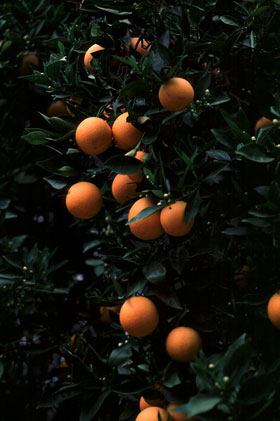
  • Step 1. Open the photo in your photo editor. We will enhance the photo of an orange-tree taken at a short distance. The photo is dark, the contrast is poor and therefore the leaves and fruits in the background are hardly visible.
    Photo of an orange-tree
  • Step 2. Call AKVIS Enhancer plugin. To this effect select the command Filter - AKVIS - Enhancer in Adobe Photoshop; the menu item Effects - Plugins- AKVIS - Enhancer if you work with Jasc Paint Shop Pro; or Effects - AKVIS - Enhancer if you use Corel PHOTO-PAINT.

    You will see the following AKVIS Enhancer window with the photo processed at default parameter values.

    AKVIS Enhancer window

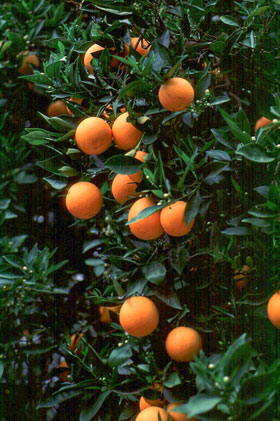
    The photo has been improved at the default parameters and we do not need to correct it further. The level of detail has increased, the image has become more contrasting, and you can see even the smallest leaves of the orange-tree.

  • Step 3. Press the button Ok in the Toolbar to apply the result of the photo correction and close the plugin window.
    The original photo Result of the image enhancement
    Before After
 
AKVIS Enhancer プラグイン AKVIS Enhancer プラグイン
   — ワークスペース — ワークスペース
   — Enhancerモード
 — Enhancerモード
   — フォーカス モード
 — フォーカス モード
   — バッチ処理 — バッチ処理
AKVIS Enhancer - HDR AKVIS Enhancer - HDR
   — ワークスペース — ワークスペース
   — Enhancerモード
 — Enhancerモード
   — フォーカス モード — フォーカス モード
   — 連続した写真の処理(HDRモード) — 連続した写真の処理(HDRモード)
   — HDRIとは? — HDRIとは?
操作例 操作例
   — 教会 — 教会
   — 街路 — 街路
   — 庭で遊ぶ子供 — 庭で遊ぶ子供
   — 大型トラック — 大型トラック
   — 古代都市 — 古代都市
   — シカ — シカ
   — 高地の風景(HDR) — 高地の風景(HDR)


   プライバシー | サイトマップ | Web サイトの検索 | English  | Français  | Deutsch  | Español  | Português  | Italiano  | 日本語  | Pусский  | © 2004-2008, AKVIS Software Inc. All rights reserved.