Restoration of an old family photo
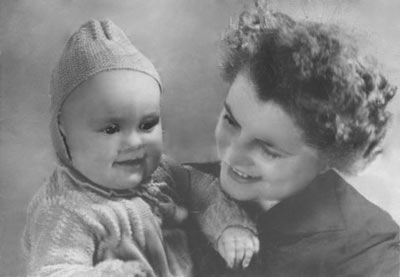
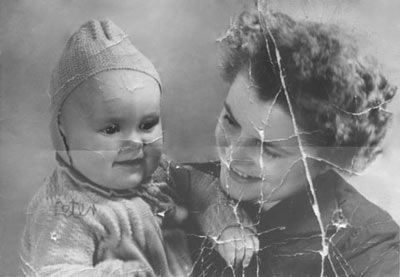
Take a look at the old scanned photo and the result of restoration in AKVIS Retoucher AI.
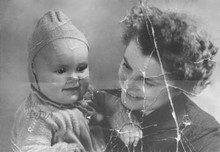
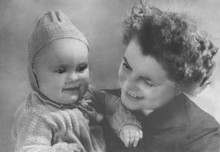
This old photo is considerably damaged. We will restore this photo in two stages. At the first stage we will apply automatic processing in AKVIS Retoucher AI that will perform the preliminary work of removing most scratches and making big scratches less visible. At the second stage we will retouch the remaining defects with the post-processing retouching tools.
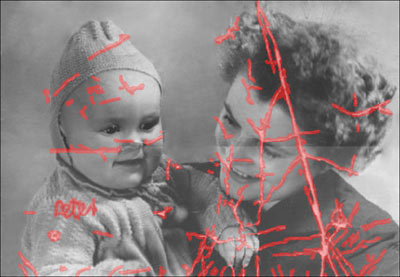
- Step 1. Selection of the damaged area.
First of all, we should paint over all scratches and the inscription on the child's shoulder using the Selection Brush
 in AKVIS Retoucher AI.
We do not paint over the fold line that crosses the photo as it goes across the faces of the mother and child and it can be retouched better manually.
- Step 2. Automatic restoration.
Press the
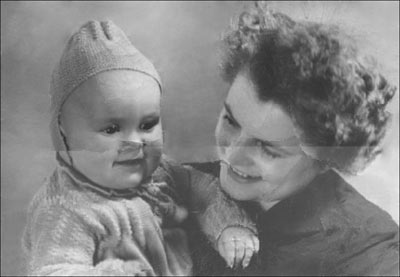
 button to start the photo restoration process. The program reconstructs selected parts of a photo by using information from surrounding areas.
When Retoucher is through with its job, the photo will look like this:
- Step 3. Retouching tools.
Now you can proceed to the second stage of restoration and retouch minor defects with the post-processing tools: Clone Stamp
 and Chameleon Brush
  . Both are available only in Home Deluxe and Business versions of Retoucher.
Alternatively, you can remove small defects using AliveColors which offers these and some other useful retouching tools.
Retoucher AI v. 13.0 - Free 10-day Trial
