Graphic software for Windows Mac graphic software
Tragen Sie Ihre E-Mail ein, um den AKVIS-Newsletter zu abonnieren.
 
  
  Produkte     Download     Online Store     Tutorial     Support     Impressum
en  fr  de  es  pt  it  jp  ru    
 

Tutorial: AKVIS Coloriage

A Castle in Scotland: colourizing an old photo


Entschuldigung. Jetzt ist die Information nur auf Englisch vorhanden. Die deutsche Version wird bald veröffentlicht werden.

In this tutorial David Kelly colourizes a photo of a castle in Scotland. The copyright for the original photo is held by the University of Strathclyde, Glasgow, and is used with their permission.


FOREWORD

Previous photographs colourized using AKVIS Coloriage plug-in in conjunction with Paint Shop Pro 9 were typical head and shoulder portraits containing few detailed areas, which made colourizing straightforward.

Using Paint Shop Pro 9 on its own it was possible with selections, layers, and masks, etc., to successfully colourize photographs that contained small, detailed areas. Could using Coloriage to colour this type of image produce acceptable results? To find out I used an 1870 sepia-toned photograph of a stately Scottish family home, Crossbasket House.


THE ORIGINAL PHOTOGRAPH

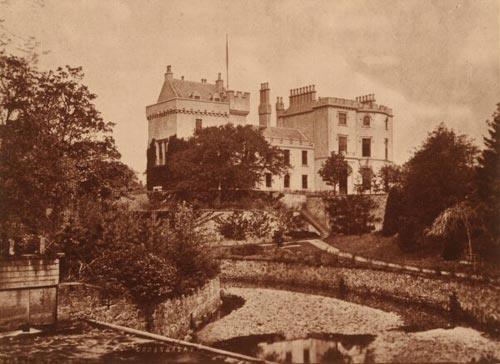
The original 1870 sepia-toned Crossbasket House photograph is shown below, Image 01.
Crossbasket House -  sepia-toned photograph
Image 01. Crossbasket House, 1870. Photo by Thomas Annan - Copyright © University of Strathclyde


HOW IT WAS DONE

The steps below explain how Paint Shop Pro 9, in conjunction with three AKVIS plug-ins, Noise Buster, Enhancer, and Stamp, was used to convert the original sepia-toned photo into a black and white image suitable for colourizing.

  • Step 1. Original photo loaded into Paint Shop Pro.
  • Step 2. Reduced noise levels: Effects - Plugins - AKVIS - Noise Buster. Noise Buster's one-button-click Automatic Filtering feature was used to reduce the photo's noise levels.
  • Step 3. Converted to greyscale: Image - Greyscale.
  • Step 4. Increased colour depth to 16 million colours (24bit): Image - Increase Colour Depth - 16 million colours (24bit).
  • Step 5. Increased brightness and contrast levels: Adjust - Brightness and Contrast - Levels.
  • Step 6. Enhancer was used to improve detail: Effects - Plugins - AKVIS - Enhancer.


THE BLACK & WHITE PHOTOGRAPH

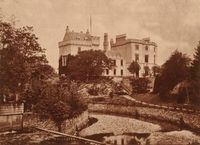
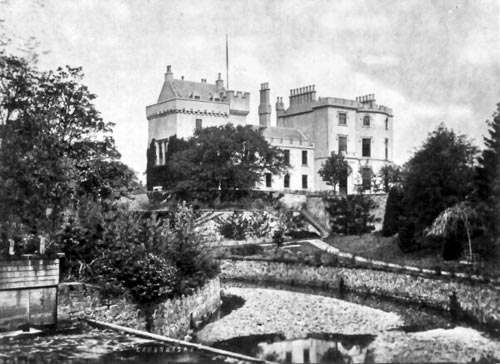
The editing steps 02 to 06 produced the black and white photograph below, Image 02.
after the preliminary processing
Image 02

  • Step 7. PSP9 tools were used to create then add a new flagpole.
  • Step 8. AKVIS Stamp cloning tool was used to remove the Crossbasket name, just visible bottom-middle-left.
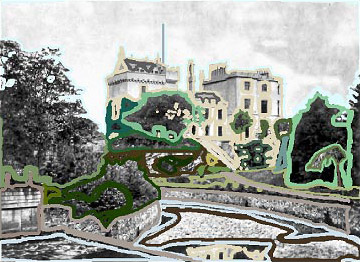
  • Step 9. AKVIS Coloriage plug-in was called from: Effects - Plugins - AKVIS - Coloriage. Next, suitable coloured strokes were drawn around the photo's various sections. Image 03 below shows how the black and white photo, complete with its new flagpole looked after the strokes were added. For a comprehensive Coloriage tutorial please click here.
Colour strokes in AKVIS Coloriage
Image 03
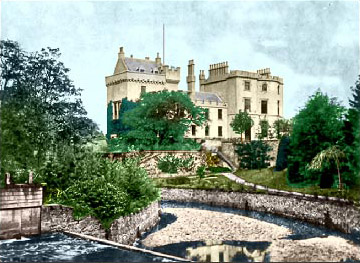
  • Step 10. The small green "Run" button Run located top-left was clicked to preview the finished coloured version inside Coloriage's workspace. See Image 04.
coloured version
Image 04
  • Step 11. After previewing, and being happy with the results, the stroke file was named and saved. It could now be reloaded at any time and changed as necessary.
  • Step 12. Finally the green "Apply" button Apply, top-right, was clicked to colourize the black and white photo. This closed the Coloriage plug-in to reveal PSP9's workspace that now contained the newly colourized Crossbasket House photograph.
  • Step 13. AKVIS Stamp cloning tool was used on the colourized image to improve the blue sky plus fix a few other slight imperfections.
  • Step 14. PSP9 tools in conjunction with layers were used to add a couple of wispy clouds, and as a finishing touch a new flag was attached to the house's flagpole.
  • Step 15. Enhancer was used to improve overall detail levels.
  • Step 16. Finally the house's part reflection seen in the water, bottom-middle-right, had its colour saturation level reduced.


THE COMPLETED PHOTOGRAPH

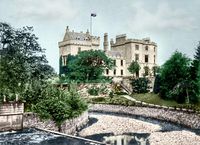
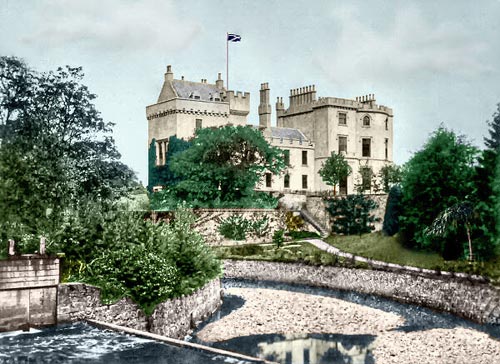
The edited, colourized photo is shown below, Image 05.
coloured version of the Scottish castle
Image 05

 
Vorgehensweise Vorgehensweise
   — Arbeitsbereich — Arbeitsbereich
   — Arbeitsweise — Arbeitsweise
   — Tipps und Tricks — Tipps und Tricks
   — Datei mit den Markierungen (*.strokes) — Datei mit den Markierungen (*.strokes)
Beispiele Beispiele
   — Eine alte Postkarte — Eine alte Postkarte
   — Grundfarbe des Autos ändern — Grundfarbe des Autos ändern
   — Einfärben eines S/W-Fotos — Einfärben eines S/W-Fotos
   — Bilder teilweise entfärben — Bilder teilweise entfärben
   — Eine Frau mit Flieder — Eine Frau mit Flieder
   — Farbkorrektur: rote Augen entfernen — Farbkorrektur: rote Augen entfernen
   — Ein Portrait einfärben — Ein Portrait einfärben
   — Ein Verfahren zum mehrmaligen Einfärben — Ein Verfahren zum mehrmaligen Einfärben
   — Ein Geschenk zum Muttertag — Ein Geschenk zum Muttertag
   — Kanadische Siedler — Kanadische Siedler
   — Foto eines Kindes — Foto eines Kindes
   — Farben für die Innenausstattung — Farben für die Innenausstattung
   — Einfärben eines Familienfotos — Einfärben eines Familienfotos
   — Die Farbe der Kleidung ändern — Die Farbe der Kleidung ändern
   — Einfärben eines Gruppenfotos — Einfärben eines Gruppenfotos
   — Farbiger Hintergrund — Farbiger Hintergrund
   — Erinnerungen einfärben — Erinnerungen einfärben
   — Die Wände anstreichen — Die Wände anstreichen
   — Mosaik-Hintergrund — Mosaik-Hintergrund
   — Partielle Einfärbung — Partielle Einfärbung
   — Ausdrucksvolle Augen einer Katze — Ausdrucksvolle Augen einer Katze
   — Porträt einer Geisha — Porträt einer Geisha
   — Flachrelief einfärben — Flachrelief einfärben
   — Tipps zum Kolorieren — Tipps zum Kolorieren
   — Alte Postkarte mit einer Geisha — Alte Postkarte mit einer Geisha
   — Nachbearbeitung eingefärbter Fotos — Nachbearbeitung eingefärbter Fotos
   — Zeichnung im Anime-Stil — Zeichnung im Anime-Stil
   — Ein Foto für Fotomontage — Ein Foto für Fotomontage
   — Blumen ausmalen — Blumen ausmalen
   — Zeichnung: Selbstbildnis — Zeichnung: Selbstbildnis
   — Weihnachtspostkarte — Weihnachtspostkarte
   — Liebesgeschichte — Liebesgeschichte
   — Zeichnung ein- und umfärben — Zeichnung ein- und umfärben
   — Ein misslungenes S/W-Foto retten — Ein misslungenes S/W-Foto retten
   — Kinderbilder — Kinderbilder
   — Ein Geschenk für die Frau — Ein Geschenk für die Frau


   Datenschutzhinweis | Sitemap | Suchwort eingeben | English  |Français  | Deutsch  |Español  |Português  |Italiano  |日本語  |Pусский  | © 2004-2009, AKVIS Software Inc. Alle Rechte vorbehalten.