Efecto Glamour
La palabra Glamour es sinónimo de elegancia, fascinación y seducción. Esta palabra se aplica frecuentamente en las revistas de moda para describir una persona atractiva y elegante. El glamour es el equilibrio perfecto entre belleza y maquillaje.
Glamour significa también un estilo especial en la fotografía que presta mucha atención a la aparición perfecta de una modelo. La piel debe ser lisa y pura. El efecto Glamour quita los defectos de la piel, reduce las pequeñas arrugas y hace que el modelo parece perfecto.
Cada mujer quiere sentirse hermosa, sobre todo en las fotos que se guardan en los álbumes de foto durante años.
El efecto Glamour le ayudará a lograr la perfección en sus retratos. ¡No sólo las estrellas de cine pueden ser glamorosas!
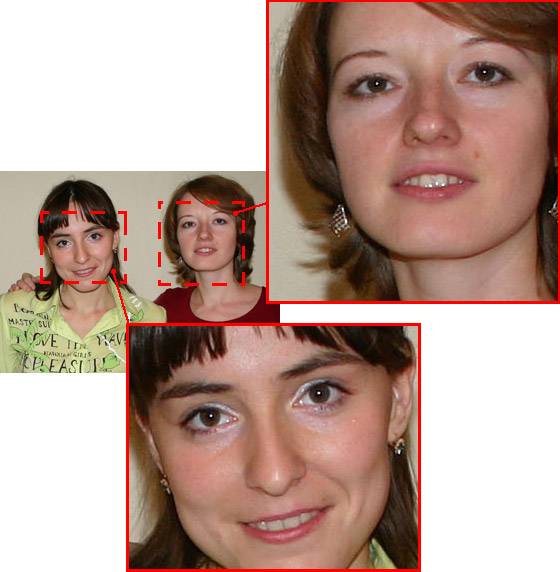
Imagen original
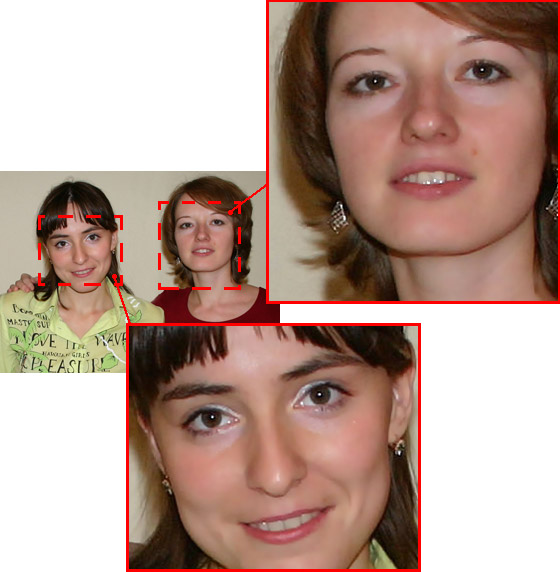
Resultado
El efecto tiene los siguientes controles:
-
Colores. Este campo incluye un conjunto de colores que serán utilizados para el tratamiento de la imagen.

Conjunto de coloresHay 6 casillas de color. Por defecto, estas casillas están vacías. Si inicia el procesamiento de imágenes con la configuración por defecto, no habrá cambios.
Haga clic en una casilla vacía, el cursor se transforma en un cuentagotas. Elija un color de la imagen con un clic izquierdo. La casilla mostrará el color seleccionado.
Para cambiar el color de la casilla, haga clic izquierdo sobre ella y seleccione otro color de la imagen.
Para eliminar un color, haga clic derecho en la casilla. La casilla se quedará vacía.
Nota: El botón Valores por defecto permite recuperar la configuración por defecto de los parámetros.
- El parámetro Amplitud (0-20) define los colores que se utilizarán para el tratamiento. En el valor mínimo del parámetro sólo los colores del conjunto de colores están suavizados. Si aumenta el valor del parámetro, los colores similares a los colores del conjunto se cambiarán también. Cuanto mayor sea el valor del parámetro, más colores se cambiarán.
-
El parámetro Suavizar (1-100) suaviza la imagen reduciendo el contraste de colores entre los píxeles vecinos.

Suavizar = 10
Suavizar = 75
ArtSuite v. 21.1 - Prueba gratuita de 10 días
