Esquina doblada
El efecto Esquina doblada permite imitar una esquina doblada de la imagen. El color del bucle, su forma y el nivel de torsión se ajustan en el Panel de ajustes.

El Panel de ajustes ofrece los siguientes parámetros para ajustar el efecto de Esquina doblada.
Color del fondo. El color del área debajo del bucle. Seleccione un color haciendo doble clic en el rectángulo de color y eligiendo un color.

Color verde
Transparente. Cuando la casilla Transparente está marcada, las partes de la imagen bajo el bucle se ponen transparentes. Esto es práctico si tiene una imagen con varias capas; de este modo, la imagen en la capa inferior(s) es visible y sirve de marco.

la casilla Transparente
está marcada
Color del bucle. Seleccione un color para el bucle haciendo doble clic sobre el rectángulo de color y eligiendo un color.

Color del bucle: amarillo
Torsión (0-100%). El parámetro define el nivel de la torsión del bucle. Cuanto más alto sea el valor, más retorcido es el bucle.

Torsión = 60%

Torsión = 90%
Inclinación (0-100%). El parámetro establece la forma del bucle. En valores de 1 a 49 la esquina de la imagen forma un cono (el vértice está en uno de los extremos); a 50 la esquina forma un cilindro; en valores de 51 a 100 ella forma un cono de nuevo, pero el vértice se encuentra en el extremo opuesto.

Inclinación = 10

Inclinación = 50

Inclinación = 90
La línea con marcadores en ambos extremos define la esquina para doblar, su posición y la dirección de la curvatura. Utilice los marcadores para establecer la posición de la línea. Para mover un marcador, lleve el cursor sobre éste, pulse el botón izquierdo del ratón y arrastre el marcador a una nueva posición. No se puede doblar más que la mitad de la imagen.







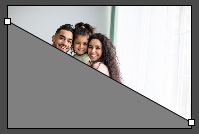
Gradiente (0-100%). El parámetro permite añadir volumen a la esquina doblada ajustando el contraste de los tonos medios del bucle.
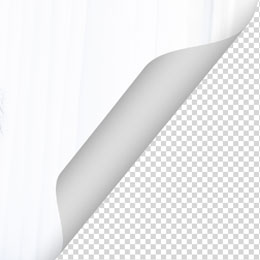
Gradiente = 20%
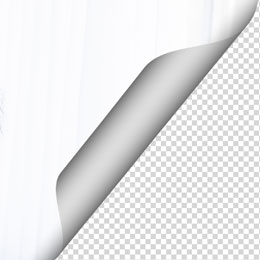
Gradiente = 50%
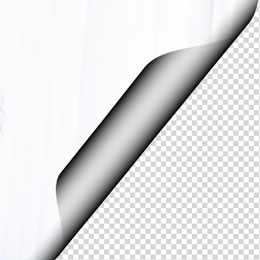
Gradiente = 100%
ArtSuite v. 20.0 - Prueba gratuita de 10 días

