Graphic software for Windows Mac graphic software
Please enter your email to be kept posted on updates and discounts:
 
  
  Products     Download     Online Store     Tutorial     Support     Company
en  fr  de  es  pt  it  jp  ru    
 

Tutorial: AKVIS Enhancer

High dynamic range image


When you shoot a scene comprising both a strong light source and deep shadows you will notice that details either in shadows or in highlights get lost. Imagine you stay in a dark room and try to take a view outside the window - you will see only one thing in detail - either the view or the room's interior. However, there is a method for keeping detail in every single part of the image.

HDRI (High Dynamic Range Imaging) is a technology that expands the dynamic range of an image and shows details in both shadows and highlights.

Dynamic Range is a range of brightness values that can be recorded on media (film, photographic plate, photographic paper) or on the matrix of a digital camera.

In contrast to the modern cameras that have a low dynamic range, the human eye is able to discern many more tonal values and sees details of any object at any lighting. Compare: the human eye can perceive 100 million colors and shades at a time, while a camera can distinguish only between 16,8 million colors, which is 6 times less.

HDRI technology minimizes this discrepancy by combining several shots to get an image very close to what the photographer sees with his eyes. However, monitors, just like cameras, have a lower dynamic range and can not render an HDR-image to the best advantage. That is why a technology called Tone Mapping is applied to compress the dynamic range of an HDR-image without degrading the image quality. The resulting image is called LDR (low dynamic range) image, but it looks much better than the original images.

The difference is evident if you take high contrast shots.

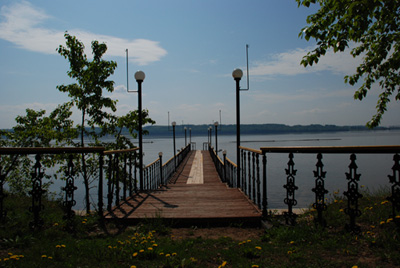
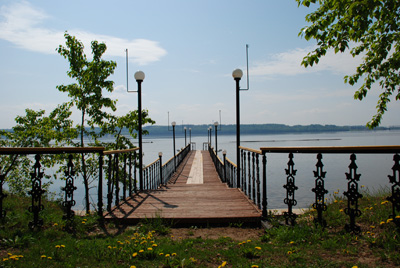
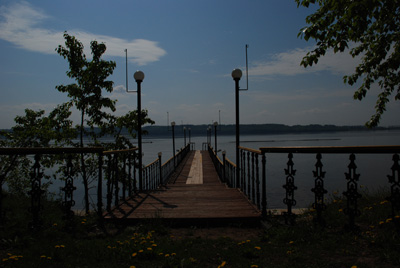
Compare the original shots:
Open an image
Open an image
Open an image

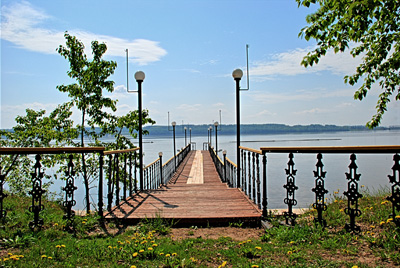
And the result of HDRI processing:

Open an image

Earlier, one had to use gradient filters when shooting or various tools of Adobe Photoshop (masks, layers) to get a similar image.

With the advent of HDRI technology the process has been simplified. Now it is sufficient to take a series of shots of one and the same object using different exposure settings, then load the images into AKVIS Enhancer and combine them into one image.

 
How it works How it works
AKVIS Enhancer Plug-In AKVIS Enhancer Plug-In
   — Workspace — Workspace
   — Enhancer mode — Enhancer mode
   — Focus mode — Focus mode
   — Batch Processing — Batch Processing
AKVIS Enhancer Stand-alone  (+HDR) AKVIS Enhancer Stand-alone (+HDR)
   — Workspace — Workspace
   — Enhancer mode — Enhancer mode
   — Focus mode — Focus mode
   — HDR mode — HDR mode
   — High dynamic range image — High dynamic range image
   — Post Processing — Post Processing
Examples Examples
   — In the Street — In the Street
   — A Child in the Garden — A Child in the Garden
   — Highlands scenery (HDR)  — Highlands scenery (HDR)
   — Lorry — Lorry
   — Neuschwanstein Castle — Neuschwanstein Castle
   — Ancient Town — Ancient Town
   — Fun Slides in the Countryside(HDR) — Fun Slides in the Countryside(HDR)
   — Increase the Clearness of a Photo — Increase the Clearness of a Photo
   — Dark Picture of a Church — Dark Picture of a Church
   — Tennis-court — Tennis-court
   — Archery — Archery
   — Orthodox Chapel — Orthodox Chapel
   — Orange Tree — Orange Tree
   — Backlight Photo — Backlight Photo
   — Technical Illustration — Technical Illustration
   — Town at Night — Town at Night
   — Underexposed Photo — Underexposed Photo
   — A Kid with a Rattle — A Kid with a Rattle
   — African Kids — African Kids
   — A Siamese Cat — A Siamese Cat
   — Remove Smog from the Photo — Remove Smog from the Photo
   — A Poet and Doves — A Poet and Doves
   — A Black Cat in a Dark Room — A Black Cat in a Dark Room
   — Christmas Market — Christmas Market
   — Exposure Correction — Exposure Correction
   — Correction of a Dark Photo — Correction of a Dark Photo
   — Khan Palace Photo — Khan Palace Photo
   — Street Photo — Street Photo
   — Show Details in Shadows — Show Details in Shadows
   — An Old Brewery in a New Light (HDR) — An Old Brewery in a New Light (HDR)
   — The Golden Pavilion — The Golden Pavilion
   — An Ominous Way — An Ominous Way


   Privacy Policy | Site Map | Search | English  |Français  |Deutsch  |Español  |Português  |Italiano  |日本語  |Pусский  | © 2004-2009, AKVIS Software Inc. All rights reserved.