Graphic software for Windows Mac graphic software  
Please enter your email to be kept posted on updates and discounts:
 
  
  Products     Download     Online Store     Tutorial     Support     About Company
en  fr  de  es  pt  it  jp  ru    
 

Tutorial: AKVIS Enhancer

How to get shots with different exposures


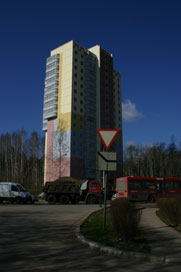
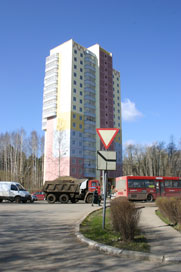
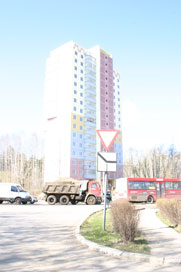
To generate an HDR-image you need a series of shots of the same scene taken with different exposures. It is possible to use Manual mode or Automatic Bracketing mode.

Let's look at the second option in detail. Follow the instruction below to take a series of shots with different exposure settings using automatic bracketing:

  1. Set your digital camera to automatic bracketing mode (AEB). Generally, this mode allows taking three shots: normal, underexposed and overexposed. Some digital cameras allow taking 5 and more shots.

  2. Set the range of exposures for automatic bracketing. We recommend the following values: -2, 0,+2.

  3. Set the ISO parameter to a value not higher than 100; otherwise, the shots may have too much noise, which is difficult to handle.

  4. Select the jpg format.

  5. Set maximum image size.

  6. Select a subject for shooting. When shooting outside you can encounter some problems. The scene is rarely static. If there are people and cars moving, wait till they leave the scene. As for leaves trembling in the wind, there is no way to change it and it is not critical - it will not have a considerable impact on the result. If the trees themselves are shaking, it is better to delay the shooting of the subject, as it may cause the branches to double on the final image.

  7. Set the camera on a tripod or on a stable surface. If you fix the camera, the shift when shooting will be minimized.

  8. Take a series of shots.

  9. Transfer the shots to the computer. Do not alter the photos.

 
AKVIS Enhancer Plug-In AKVIS Enhancer Plug-In
   — Workspace — Workspace
   — Enhancer mode — Enhancer mode
   — Focus mode — Focus mode
   — Batch Processing — Batch Processing
AKVIS Enhancer - HDR program AKVIS Enhancer - HDR program
   — Workspace — Workspace
   — Enhancer mode — Enhancer mode
   — Focus mode — Focus mode
   — HDR mode — HDR mode
   — High dynamic range image — High dynamic range image
Examples Examples
   — Dark Picture of a Church — Dark Picture of a Church
   — Tennis-court — Tennis-court
   — In the Street — In the Street
   — A Child in the Garden — A Child in the Garden
   — Archery — Archery
   — Lorry — Lorry
   — Orthodox Chapel — Orthodox Chapel
   — Ancient Town — Ancient Town
   — Increase the Clearness of a Photo — Increase the Clearness of a Photo
   — Orange Tree — Orange Tree
   — Backlight Photo — Backlight Photo
   — Technical Illustration — Technical Illustration
   — Town at Night — Town at Night
   — Underexposed Photo — Underexposed Photo
   — A Kid with a Rattle — A Kid with a Rattle
   — African Kids — African Kids
   — A Siamese Cat — A Siamese Cat
   — Remove Smog from the Photo — Remove Smog from the Photo
   — A Poet and Doves — A Poet and Doves
   — A Black Cat in a Dark Room — A Black Cat in a Dark Room
   — Christmas Market — Christmas Market
   — Exposure Correction — Exposure Correction
   — Correction of a Dark Photo — Correction of a Dark Photo
   — Khan Palace Photo — Khan Palace Photo
   — Street Photo — Street Photo
   — Show Details in Shadows — Show Details in Shadows
   — Neuschwanstein Castle — Neuschwanstein Castle
   — Fun Slides in the Countryside(HDR) — Fun Slides in the Countryside(HDR)
   — An Old Brewery in a New Light (HDR) — An Old Brewery in a New Light (HDR)
   — Highlands scenery (HDR)  — Highlands scenery (HDR)


   Privacy Policy | Site Map | Search | English  | Français  | Deutsch  | Español  | Português  | Italiano  | 日本語  | Pусский  | © 2004-2008, AKVIS Software Inc. All rights reserved.