Graphic software for Windows Mac graphic software
Entrez votre e-mail pour souscrire à notre liste de diffusion.
 
  
  Produits     Télécharger     Magasin en ligne     Tutoriel     Support     Compagnie
en  fr  de  es  pt  it  jp  ru    
 

Tutoriel: AKVIS Chameleon

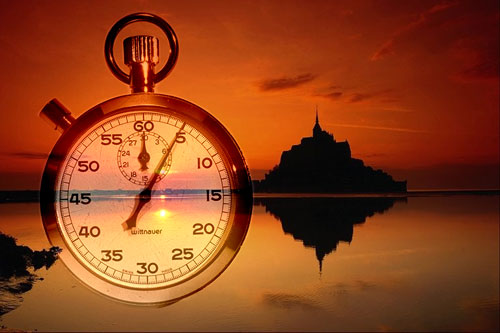
Time goes by like water: a photo collage in Corel Photo-Paint


Désolé, à présent cette information n'est disponible qu'en anglais. La version française sera bientôt affichée.

Sunrises replace sunsets and time goes by like sand through your fingers...

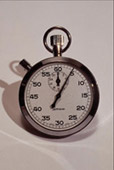
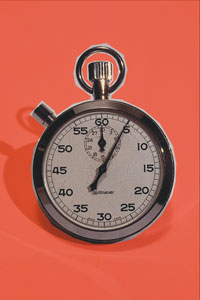
To create a "philosophic" photo collage symbolizing the eternal beauty of nature and the fleetingness of the human life we have chosen two photos: a sunset photo and a stop-watch.
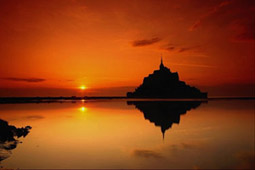
a stop-watch a sunset photo

We will make the photo collage in Corel Photo-Paint using AKVIS Chameleon Plug-in in the Snapshot mode. Follow the instructions below:

  • Step 1. Open the photos in your photo editor.
  • Step 2. First open the image with the stop-watch and activate any selection tool, for example Magnetic Mask Tool.

    In the Options palette of the chosen selection tool deactivate the check-box Anti-aliasing.

  • Step 3. Outline the stop-watch with the selection tool. Read more about Magnetic Mask Tool here.
    Select the stop-watch Select the stop-watch
  • Step 4. Copy the selected stop-watch into the buffer by pressing the buttons Ctrl+C or by calling the command Copy -> Edit.
  • Step 5. Activate the image with the sunset and call the command Effects -> AKVIS -> Chameleon (Take Snapshot) to take a snapshot of the image. We will need this snapshot the next time we call the plug-in. We use the Snapshot mode to make the background image visible through the pasted object. In this case we want the stop-watch to adapt its color range to the photo and to be semi-transparent.
  • Step 6. Paste the stop-watch into the sunset photo by calling the command Edit -> Paste -> Paste as New Selection.
    Paste the stop-watch into the sunset photo
  • Step 7. Do not remove the mask!
  • Step 8. Select Object Pick Tool in the Toolbar and move the stop-watch to the left, just a little bit.
    Move the stop-watch
  • Step 9. Call the command Mask -> Invert twice. This double command does not change anything visually but without it you won't get the plug-in working in Corel Photo-Paint.
  • Step 10. Call the plug-in AKVIS Chameleon by selecting the command AKVIS -> Chameleon (Use Snapshot) in the menu Effects.
    Call AKVIS Chameleon
  • Step 11. Remove the mask with the command Mask -> Remove. The photo collage is ready.
    Remove the mask
  •  

 
Espace de travail Espace de travail
Comment fonctionne-t-il? Comment fonctionne-t-il?
Montage Mode Montage Mode
   — Chasseur d'images — Chasseur d'images
   — Joyeuses Pâques! — Joyeuses Pâques!
Caméléon Mode Caméléon Mode
   — Les voiliers au coucher de soleil — Les voiliers au coucher de soleil
   — Changer l'apparence  — Changer l'apparence
   — Se faire un tatouage — Se faire un tatouage
   — Le singe et un masque — Le singe et un masque
   — Timbre postal — Timbre postal
   — L'Étiquette pour une boisson — L'Étiquette pour une boisson
   — Caméléon en feu — Caméléon en feu
   — Le hollandais volant — Le hollandais volant
   — Chat dans les fleurs — Chat dans les fleurs
   — Éléphant dans la savane — Éléphant dans la savane
   — Fouilles archélogiques — Fouilles archélogiques
   — Le lac des cygnes — Le lac des cygnes
   — La vue de la Terre — La vue de la Terre
   — Collage avec une fille — Collage avec une fille
   — Colombe de la paix — Colombe de la paix
   — Une petite fille — Une petite fille
   — Une carte de voeux — Une carte de voeux
   — Clair de lune — Clair de lune
   — Animer le paysage — Animer le paysage
Fusionner Mode Fusionner Mode
   — Peinture sur bois — Peinture sur bois
   — Carte postale — Carte postale
   — Carte de St Valentin — Carte de St Valentin
   — Paysage d'automne — Paysage d'automne
   — Le papillon sur le mur — Le papillon sur le mur
   — Pigeon dans le feu — Pigeon dans le feu
   — Collage fantastique — Collage fantastique
   — Photo en feu — Photo en feu
   — Oiseau dans la forêt fantastique — Oiseau dans la forêt fantastique
   — Cerises mûres — Cerises mûres
   — Changer le ciel — Changer le ciel
Émersion mode Émersion mode
   — Pour les fans de graffiti — Pour les fans de graffiti


   Politique de Confidentialité | Plan du Site | Recherche | English  | Français  |Deutsch  |Español  |Português  |Italiano  |日本語  |Pусский  | © 2004-2009, AKVIS Software Inc. Tous droits réservés.