Graphic software for Windows Mac graphic software  
Please enter your email to be kept posted on updates and discounts:
 
  
  Products     Download     Online Store     Tutorial     Support     About Company
en  fr  de  es  pt  it  jp  ru    
 

Tutorial: AKVIS Chameleon

Chameleon in the fire


The symbol of the Fire element is the salamander, the legendary reptile that could live in the fire. For lack of a salamandra, we will put into the fire a three horn chameleon.
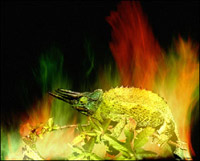
photo of a colorful fire chameleon Result
Source imagesResult

Follow these steps to create a photo collage with AKVIS Chameleon Plug-in

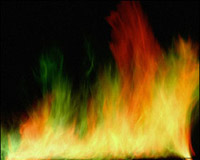
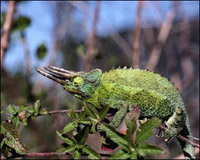
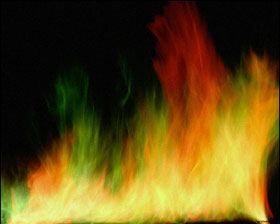
  • Step 1. Open the two images in Adobe Photoshop: a photo of a chameleon and a photo of a colorful fire.
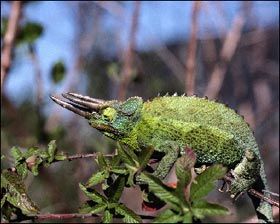
    three horn chameleonphoto of a colorful fire
  • Step 2. Switch to the Quick Mask mode and paint the chameleon and the branch with a hard-edged pencil (Hardness 100%).
  • Step 3. Switch back to the Standard mode and invert the selection by calling the command Select - Inverse or by using the key combination Ctrl+Shift+I.
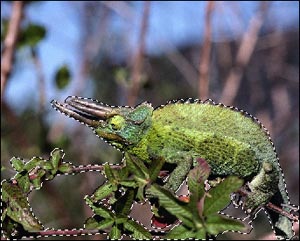
    select the chameleon
  • Step 4. Copy the selected chameleon by calling AKVIS -> Chameleon -> Grab Fragment from the Filter Menu. If all goes well you should see a message stating that the fragment has been copied to the clipboard.

    Switch to the image of the fire and call AKVIS -> Chameleon - Make Collage from the Filter menu. The AKVIS Chameleon plug-in window will appear. You will see the fire image in the background with the chameleon above it.

    Select Chameleon mode from the drop-down menu in the Settings Panel.
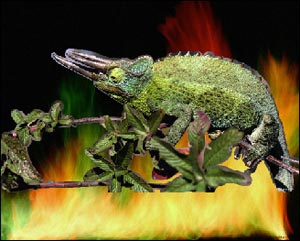
    paste the chameleon into the photo with the fire
  • Step 5. Use the Transform tool from the Toolbox to change the size of the size and position of the chameleon.
  • Step 6. Press the button to start the collage creation process. You will see a preview in the After tab. If you are satisfied with the result, press the button to apply the collage to the photo.

    Here is the result. As the legend says, the fire helped the salamander change its skin; our chameleon changed its color.
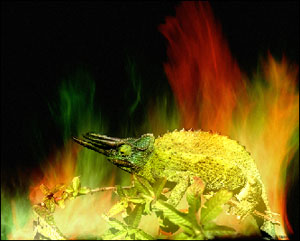
    Chameleon in the fire
 
Workspace Workspace
How It Works How It Works
Montage Mode Montage Mode
   — Photo Hunting — Photo Hunting
Chameleon Mode Chameleon Mode
   — To Sail Beyond the Sunset — To Sail Beyond the Sunset
   — Changing Appearance — Changing Appearance
   — Try on a Tattoo — Try on a Tattoo
   — Monkey and a Mask — Monkey and a Mask
   — Coffee postage stamp — Coffee postage stamp
   — Lemonade Label — Lemonade Label
   — Chameleon in the Fire — Chameleon in the Fire
   — The Flying Dutch — The Flying Dutch
   — Flowers and a Cat — Flowers and a Cat
   — Elephant in the Savanna — Elephant in the Savanna
   — Archeological Reconstruction — Archeological Reconstruction
   — The Swan Lake — The Swan Lake
   — An Earth View — An Earth View
   — Collage with a Girl — Collage with a Girl
   — Help the Dove — Help the Dove
   — A Girl in the Sunset — A Girl in the Sunset
   — A Greeting Card — A Greeting Card
   — Moonlight Sonata — Moonlight Sonata
   — Enliven the Scenery — Enliven the Scenery
   — Photo Collage in Corel Photo-Paint — Photo Collage in Corel Photo-Paint
Blend Mode Blend Mode
   — Wood Painting — Wood Painting
   — Creating a Greeting Postcard — Creating a Greeting Postcard
   — Valentine Card — Valentine Card
   — Autumn Collage — Autumn Collage
   — Butterfly on the Wall — Butterfly on the Wall
   — Dove in the Fire — Dove in the Fire
   — Fantastic Collage — Fantastic Collage
   — Blazing Photo of a Girl — Blazing Photo of a Girl
   — A Wedding Photo Collage — A Wedding Photo Collage
   — Fairy Tale Illustration — Fairy Tale Illustration
   — Ripe Cherries — Ripe Cherries
   — Bird in the Sky: B&W + color — Bird in the Sky: B&W + color
   — Sky Swapping — Sky Swapping
   — Creative Design in Paint Shop Pro — Creative Design in Paint Shop Pro
   — Time Goes by Like Water — Time Goes by Like Water
   — Wallpaper with a Leopard — Wallpaper with a Leopard
Emersion Mode Emersion Mode
   — For Graffiti Fans — For Graffiti Fans


   Privacy Policy | Site Map | Search | English  | Français  | Deutsch  | Español  | Português  | Italiano  | 日本語  | Pусский  | © 2004-2008, AKVIS Software Inc. All rights reserved.