Correction of a dark photo: improve detail and reduce noise.


Entrar seu e-mail para subscrição em novidades.
 
 
  Produtos     Download     Online Store     Tutorial     Suporte     Quem Somos      Conta de usuário
en  fr  de  es  pt  it  jp  ru    
 

Tutorial: AKVIS Enhancer

Correction of a Dark Picture


Neste momento algumas páginas estão disponíveis somente em Inglês e em Espanhol.
Você pode obter uma licença para qualquer programa AKVIS, se traduzir os arquivos do nosso acervo
para o Português (do espanhol ou do inglês) para saber mais escreva para o team@akvis.com

Jean-Claude Grégoire offers us a tutorial on how to improve a photo with uneven exposure.

Jean-Claude wrote:

For this tutorial I used Adobe Photoshop and the AKVIS Enhancer and AKVIS Noise Buster plug-ins.

Even in very bad cases, the AKVIS Enhancer and AKVIS Noise Buster plug-ins can help you salvage underexposed pictures. In my collection, I have some seriously underexposed photos which, in the past, I tried to salvage with Adobe Photoshop. This was always a long and difficult work and I often needed to use several adjustment layers, or to go into another color mode, or both, without getting a satisfactory result each time. Now that I've discovered the AKVIS Enhancer and AKVIS Noise Buster plug-ins, I've decided to try my luck again with some of those bad pictures : I really was very impressed, because in a few minutes I often got better results than in hours of working with Photoshop alone.

So I decided to share my experience by writing a short tutorial for which I chose an underexposed picture taken last year by one of my grand daughters. She photographied her mother working at home with her laptop. Unfortunately, the flash didn't work and everybody thought the photo was good for the trash can.

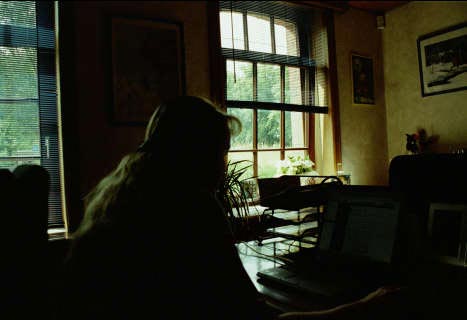
  • Step 1. I got the negative and scanned it. Actually, it was a very bad case and when processing the picture in Adobe Photoshop I couldn't get a fully acceptable result, even with the help of several adjustment layers and masks.
    the scanned dark photo
  • Step 2. I load the photo in Adobe Photoshop - its size is 1868 * 1280 pixels and the resolution is 300 ppi. I call the AKVIS Enhancer plug-in (main menu: choose "Filter -> AKVIS -> Enhancer").
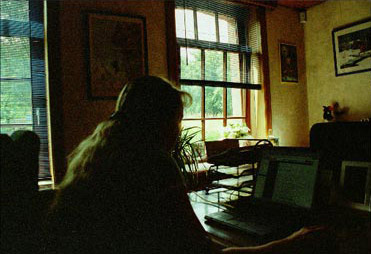
  • Step 3. I get a new window with the default settings of the plug-in and I already can see an improved image.
    AKVIS Enhancer: photo processed with the default settings

    but I decide to go further and choose the following settings:
    - Shadows: 100;
    - Highlights: 0;
    - Level of detail: 0;
    - Lightness: 100.

    AKVIS Enhancer: with the new settings
  • Step 4. I click on the apply button on the Control Panel, which applies the correction to the image and closes the plug-in.

    The image is better than the original, but as I am a perfectionist I'm not entirely satisfied with it because, there is too much noise in the darker parts of the picture.

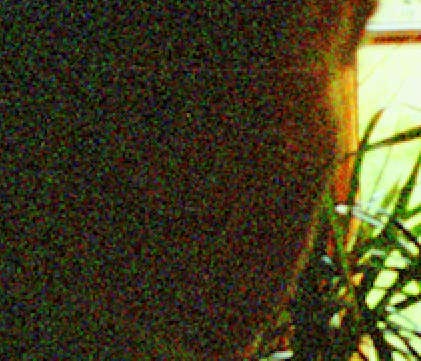
    Noise in the dark areas
  • Step 5. It's now necessary to reduce this noise. For this purpose I used the program AKVIS Noise Buster.

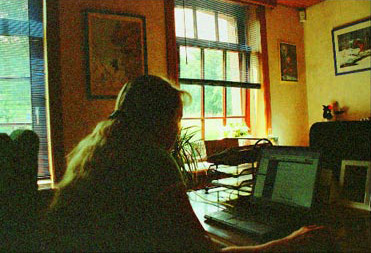
    I saved the image. Maybe it's not a "chef d'oeuvre", but nevertheless it's a very good picture!
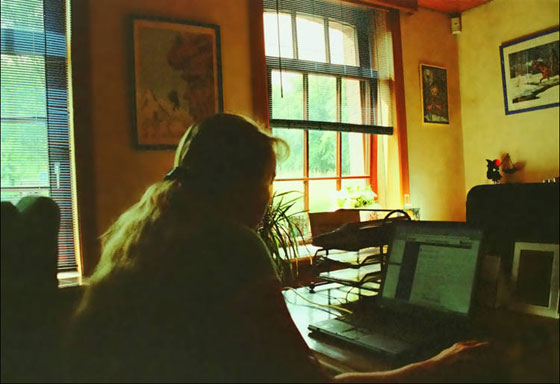
    the corrected photo
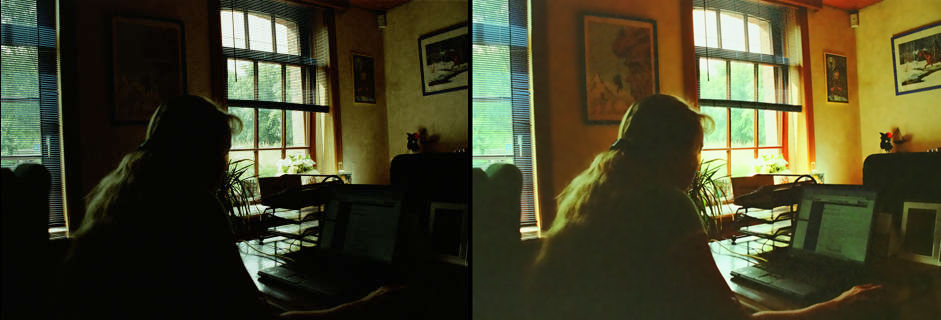
  • Step 6. The image shows the difference before and after processing - as described above - with the AKVIS Enhancer and the AKVIS Noise Buster plug-ins.

    the image before and after the correction
    Original photo and result


Como funciona Como funciona
   — Área de trabalho — Área de trabalho
   — Utilizando o programa — Utilizando o programa
   — Realçar detalhes — Realçar detalhes
   — Pre-impressão — Pre-impressão
   — Correcção de tons — Correcção de tons
   — Comparação dos modos — Comparação dos modos
   — Pós-tratamento — Pós-tratamento
   — Processamento em lote — Processamento em lote
   — Opções — Opções
Exemplos Exemplos
   — Fotografia urbana — Fotografia urbana
   — Uma criança no jardim — Uma criança no jardim
   — Veja os detalhes do caminhão — Veja os detalhes do caminhão
   — Uma cidade antiga — Uma cidade antiga
   — Uma fotografia do veado — Uma fotografia do veado
   — Um templo — Um templo
   — Em campo de jogo — Em campo de jogo
   — Uma imagen em frente de sol — Uma imagen em frente de sol
   — Arqueiros — Arqueiros
   — Laranjeira — Laranjeira
   — Uma ilustração técnica — Uma ilustração técnica
   — Uma fotografia escura — Uma fotografia escura
   — Pequenito com chocalho — Pequenito com chocalho
   — Um poeta e pombas — Um poeta e pombas
   — Mostrar detalhes nas sombras — Mostrar detalhes nas sombras
   — O pavilhão dourado — O pavilhão dourado
   — Claro como cristal:  Pre-impressão — Claro como cristal: Pre-impressão
   — Morangos frescos: Correcção de tons — Morangos frescos: Correcção de tons


No começo da página


   Política de privacidade | Mapa do Site | Pesquisar na site    
   Contacte-nos | Twitter | Facebook | YouTube Channel    
| English  |Français  |Deutsch  |Español  | Português  |Italiano  |日本語  |Pусский  | © 2004-2012 AKVIS. Todos os direitos reservados.