The Gift of Flowers: Improving An Image In AKVIS Refocus


Please enter your email to be kept posted on updates and discounts:
 
 
  Products     Download     Online Store     Tutorial     Support     Company      Customer Room
en  fr  de  es  pt  it  jp  ru    
 

Tutorial: AKVIS Refocus

The Gift of Flowers


Flowers, both real and in a painting, are pleasing to the eye and give a sense of joy and a festive mood. Perhaps this is why the image of flowers are an almost integral part of festive compositions.

Unfortunately, a poor image may spoil the reputation of these perfect works of nature. Let's take a photo of flowers in a vase which could be used in a decorative setting. The photo is beautiful but somewhat blurry. AKVIS Refocus can address this shortcoming.

Original Image: Click To Enlarge Result: Click to Enlarge
Original Image Result
(Click on either image to open a larger version in a new window)

The standalone version of AKVIS Refocus was used for this tutorial, but it's possible to obtain the same result in a graphics editor with the plug-in.

  • Step 1. Open AKVIS Refocus. Open the image of flowers by pressing .
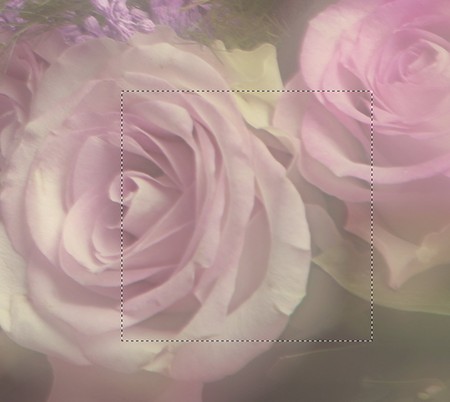
    Original Blurry Image
  • Step 2. The image will be processed automatically using the default settings (AKVIS Default preset). The result will be shown in the Before in the preview area.
    Focusing the Image Using Default Settings

  • Step 3. The image still seems a little unclear. Change the parameters in the Settings Panel as shown below:
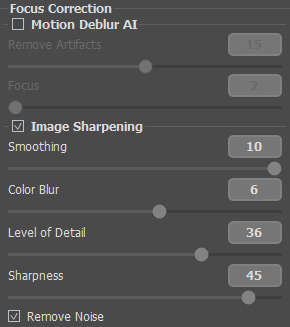
    Changes Made to Focusing Parameters

    Afterward you will see the following result:
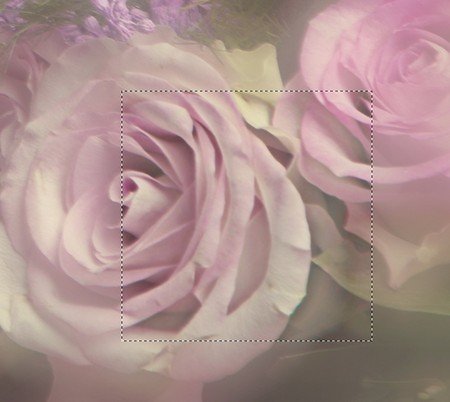
    Focusing Parameters Adjusted

    Much better.

  • Step 4. Press to process the entire image. After processing is complete the result will be shown in the After tab.

    Entire Image Processed

  • Step 5. Save the result by pressing . Now it's ready for any additional changes.
  • Step 6. To give a finishing touch to this festive composition, you could, for example, place the image in a frame (1) or make a frame from the image itself (2) (we used AKVIS ArtSuite in both cases).

    Image in frame Frame made from the image
    Possible Uses for the Image:
    1. Image in Frame 2. Image as Frame

 
How It Works How It Works
   — Workspace — Workspace
   — Working With The Program — Working With The Program
   — Preferences — Preferences
Examples Examples
   — The Gift of Flowers — The Gift of Flowers
   — Look Into My Eyes: Selective Focus — Look Into My Eyes: Selective Focus
   — Refocusing and Texture — Refocusing and Texture
   — Toy World: Tilt-Shift Effect — Toy World: Tilt-Shift Effect
   — Archery: Shifting Focus — Archery: Shifting Focus


back to top


   Privacy Policy | Site Map | Search at AKVIS    
   Contact Us | Twitter | Facebook | YouTube Channel    
| English  |Français  |Deutsch  |Español  |Português  |Italiano  |日本語  |Pусский  | © 2004-2012 AKVIS. All rights reserved.