Mädchen mit Blumen: Fokuskorrektur
Blumen sind die Liebesgedanken der Natur. Blumen sind immer ein wahrer Augenschmaus, sie bringen viel Freude und schaffen eine schöne Festatmosphäre. Vielleicht gerade deswegen sind die Blumen ein unentbehrlicher Teil der romantischen Kompositionen.
Wegen schlechter Qualität von Fotos können auch diese perfekten Naturerscheinungen einen nicht besonders guten Eindruck hinterlassen. Nehmen wir ein Foto eines Mädchens mit Blumen. Das Bild ist schön, aber etwas verschwommen. AKVIS Refocus AI kann hier Abhilfe schaffen.


Das Beispiel wurde mit der Standalone-Version von AKVIS Refocus AI erstellt. Sie können aber das gleiche Ergebnis mit dem Plugin in einem Bildbearbeitungsprogramm erzielen.
- Schritt 1. Starten Sie AKVIS Refocus AI. Öffnen Sie das Foto von Blumen, indem Sie auf die Schaltfläche
 drücken.

- Schritt 2. Aktivieren Sie den Modus Scharfstellung AI. Das Bild wird automatisch mit den Standardeinstellungen bearbeitet. Das Ergebnis wird in der Registerkarte Original im Vorschaufenster angezeigt.
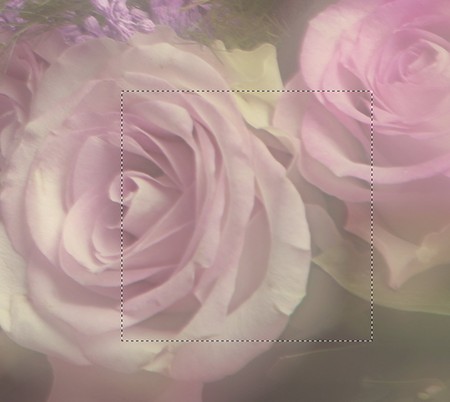
- Schritt 3. Das Bild scheint aber immer noch verschwommen zu sein. Stellen Sie die Parameterwerte in der Einstellungsleiste wie folgt ein:
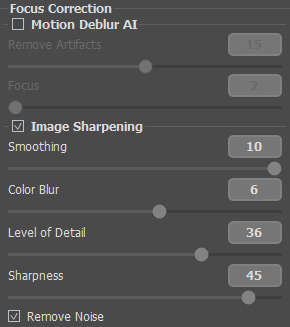
Nach der vorläufigen Bearbeitung sieht das Bild so aus:
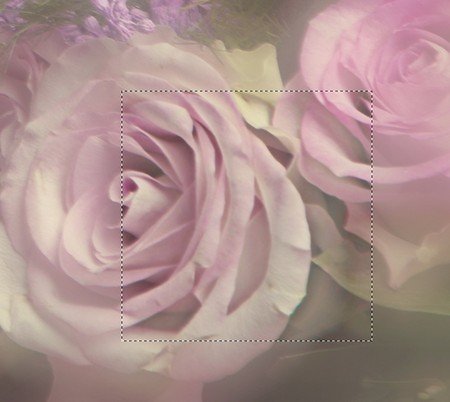
Wesentlich besser.
- Schritt 4. Klicken Sie auf
 , um das ganze Bild zu bearbeiten. Das bearbeitete Bild wird in der Registerkarte Ergebnis angezeigt.

- Schritt 5. Speichern Sie das Ergebnis durch einen Klick auf die Schaltfläche
 .
.
Refocus AI v. 11.9 - 10-Tage-Testversion
