Graphic software for Windows Mac graphic software  
Enter your email address to subscribe to the AKVIS news.
 
  
  Prodotti     Download     Online Store     Tutorial     Supporto     Chi siamo
en  fr  de  es  pt  it  jp  ru    
 

Tutorial: AKVIS Coloriage

A Present for the Mother's day


We got this example from Robert Bates from Texas.

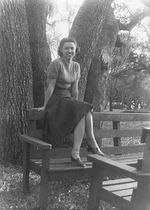
He decided to make a present to his mum for the Mother's Day - to colorize the B&W photo of his grandmother. He chose a black and white photo of his grandmother taken in early 40s in LeTulle Park, just outside of Bay City, near the Colorado River.

a black and white photo of the grandmother

To colorize the photo he did the following steps:

  • Step 1. Open the black and white photo in Jasc Paint Shop Pro 7.
  • Step 2. Call the AKVIS Coloriage plug-in by selecting the command Effects - Plugins - AKVIS - Coloriage.
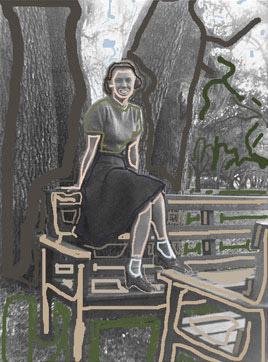
  • Step 3. Draw an outline within every object with the color you've chosen for it.
    Draw an outline within every object
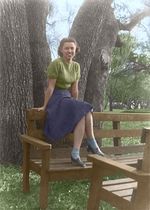
  • Step 4. Start the colorization process by pressing the button Colorize, the result will be shown in the After tab.
    the colorized photo
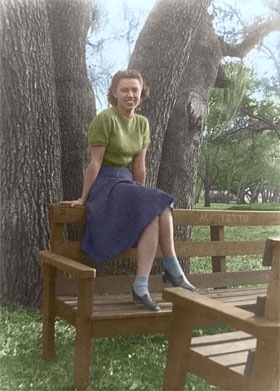
  • Step 5. Apply the colorization result to the image and close the plug-in window by pressing the button Apply the colorization result.
    The color photo

Robert's mother was happy to receive such a wonderful present, and was impressed that he had colorized his grandmother's clothes in her favorite colors.

 
Funzionamento Funzionamento
Una vecchia cartolina Una vecchia cartolina
Cambiare il colore della carrozzeria Cambiare il colore della carrozzeria
Una foto in bianco e nero Una foto in bianco e nero
Colorare un ritratto Colorare un ritratto


   Privacy Policy | Mappa del Sito | Cerca nel sito | English  | Français  | Deutsch  | Español  | Português  | Italiano  | 日本語  | Pусский  | © 2004-2008, Sviluppato da AKVIS Software Inc. Diritti Riservati.