Immagine in stile manga/anime
Questa lezione di colorazione ci è stata trasmessa da Laval Yan.
Nelle esercitazioni precedenti AKVIS Coloriage AI è stato usato per colorare fotografie in B&N. Laval Yan ha trovato un nuovo modo di utilizzare il software, aggiungendo colore all’immagine di un disegno eseguito a mano che ha trovato su Internet.
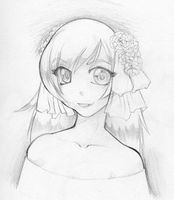
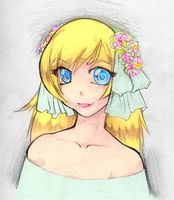
Per creare il tutorial Laval Yan ha fatto quanto segue:
- Passaggio 1. Aprire l'immagine in Adobe Photoshop e lanciare il plugin AKVIS Coloriage AI.
-
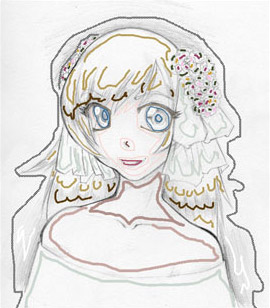
Passaggio 2. Nella modalità Classica scegliere i colori per ogni dettaglio dell'immagine anime utilizzando lo strumento
Matita Selezionare i colori per la pelle, i capelli e le labbra dalla Libreria colori. .
.Bisogna considerare che quando si traccia il colore per il viso, si dovrebbero sempre contornare gli occhi e le labbra, per evitare che l’azzurro degli occhi e il rosso della bocca si fonda con il colore della pelle.
Definire due colori per i capelli, uno oscuro e uno luminoso, inoltre ha disegnato i tratti a zig-zag.
Scegliere una serie di colori per i fiori nei capelli della ragazza anime.
-
Passaggio 3. Premere su
 per vedere il risultato, e su
  per applicare la colorazione e tornare al programma Adobe Photoshop.
-
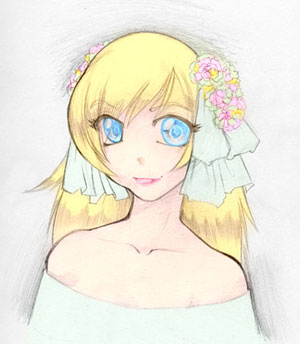
Passaggio 4. Tuttavia i colori dell’immagine sono un po’ spenti perchè è disegnata con la matita su una tela bianca.
Per rendere l'immagine più espressiva Laval Yan ha selezionato dal menu di Photoshop Immagine -> Applica immagine e nella finestra che si è aperta ha impostato la modalità Fusione su Moltiplica e premuto il pulsante OK.
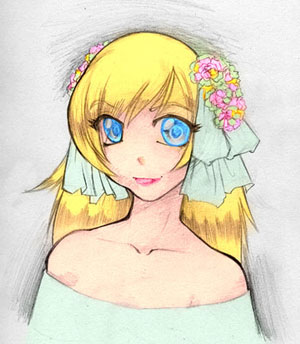
È possibile utilizzare questa tecnica per colorare bozze in stile manga e anime così come tutte le altre illustrazioni.
Coloriage AI v. 15.7 - 10-giorni di prova gratuita
