Immagini HDR (High Dynamic Range) – Cosa significa HDR
Quando si scatta una scena che comprende sia una forte sorgente luminosa che intense ombre, si noterà che i dettagli, in ombra o in luce, andranno perdersi. Immaginate di scattare una foto in una stanza illuminata da una finestra, purtroppo, nonostante la stanza sia esposta correttamente, il panorama che si osserva dalla finestra è stato annullato dalla luce bianca perché la finestra è sovraesposta. Oppure, il panorama che si osserva dalla finestra è correttamente esposto ma sfortunatamente la stanza è molto buia. Eppure guardando la scena ad occhio nudo si possono osservare contemporaneamente sia il panorama dalla finestra che la stanza.
Tuttavia, c’è un metodo che consente di mantenere il dettaglio di ogni singola parte dell’immagine: l’HDRI acronimo di High Dynamic Range Imaging.
HDRI (High Dynamic Range Imaging) è una tecnologia che estende la gamma dinamica di un'immagine e mostra i dettagli in ombra e in luce, permettendo la creazione d'immagini che siano il più vicino possibile simili all’effettiva quantità di luce presente in una specifica scena, cioè crea e gestisce immagini con un alto Dynamic Range.
Dynamic Range è una gamma di valori di luminosità tra il punto più e meno luminoso di una scena, essi possono essere registrati su un supporto (pellicola, lastra fotografica, carta fotografica) o sulla matrice di una fotocamera digitale.
In contrasto con le moderne fotocamere che hanno una bassa gamma dinamica, l'occhio umano è in grado di discernere molti più valori tonali e vede i dettagli di qualunque oggetto con qualsiasi illuminazione.
La tecnologia HDRI consente di minimizzare questa discrepanza combinando diversi scatti per ottenere un'immagine molto vicino a quello che vede il fotografo con i suoi occhi. Tuttavia, i monitor, proprio come le macchine fotografiche, hanno una minore gamma dinamica e non possono rendere ottimale un’immagine HDR. Questo è il motivo per cui, una tecnologia chiamata Tone Mapping viene applicata per comprimere la gamma dinamica di un’immagine HDR, senza degradare la qualità delle immagini. L'immagine risultante è denominata immagine LDR (bassa gamma dinamica) e sembra molto meglio rispetto all’immagine originale.
La differenza è evidente se si fanno scatti ad alto contrasto.
Confrontare le foto originali…
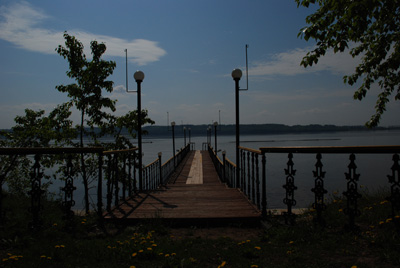
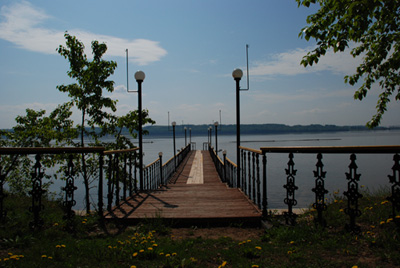
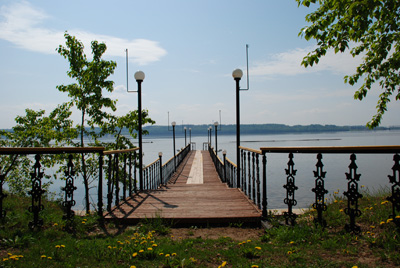
…con il risultato della trasformazione in HDRI:
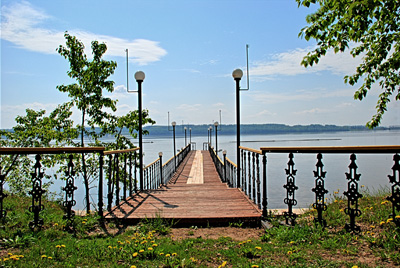
In precedenza bisognava utilizzare filtri sfumati o vari strumenti di Adobe Photoshop (maschere, livelli) per ottenere una simile immagine.
Ora è sufficiente fare una serie di scatti di uno stesso soggetto con diverse impostazioni d'esposizione, quindi caricare le foto in AKVIS HDRFactory e combinarle in un’unica immagine nella scheda HDRI.
HDRFactory v. 8.1 - 10-giorni di prova gratuita
