Come ottenere le foto necessarie a creare un’immagine HDR
Per creare un’immagine HDR dovete usare più fotografie (di solito 3-5), ognuna delle quali scattata con una diversa esposizione.
È possibile usare una fotocamera digitale con controllo manuale (e un cavalletto) o la modalità Auto Exposure Bracketing.
Seguire questi passaggi per ottenere una serie di scatti con esposizioni e impostazioni diverse utilizzando l’Auto Exposure Bracketing:
- Impostare la fotocamera digitale in modalità AEB (Auto Exposure Bracketing). Questa funzione, associata all’autoscatto, risulta davvero utile nel caso si stesse facendo una foto HDR senza un cavalletto o un comando remoto.
- Impostare 3 (o 5) scatti e la gamma delle esposizioni per l’auto bracketing, ad esempio -2, 0, +2.
- Impostare il parametro ISO ad un valore non superiore a 100 per prevenire troppo rumore digitale.
- Impostare le dimensioni massime delle immagini.
- Scegliere un soggetto da fotografare. Quando le riprese vengono eseguite all’esterno (ad esempio per strada), possono sorgere dei problemi perché raramente le scene sono statiche; se ci sono delle persone o auto in movimento, vi consigliamo di attendere fino a quando la scena sia libera. Per quanto riguarda il tremore delle foglie al vento, non c'è modo di cambiare e la situazione non è critica, essa non avrà un notevole impatto sul risultato. Se invece gli alberi sono agitati, è meglio ritardare la ripresa, in quanto i rami possono causare sdoppiamenti sull'immagine finale.
- Appoggiare la fotocamera su un supporto o una superficie stabile, gli scatti devono essere sempre nella medesima posizione.
- Eseguire una serie di scatti.
- Trasferire le fotografie sul computer.
Attenzione! Non si possono modificare le immagini, soprattutto le dimensioni (il programma riconosce le foto dalle dimensioni).
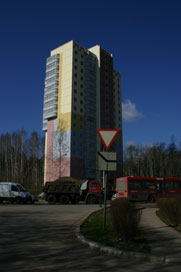
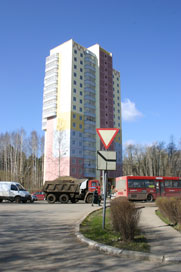
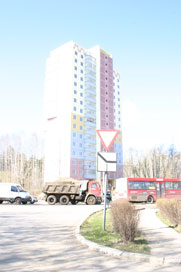
Foto con esposizione -2, 0 e +2
HDRFactory v. 8.1 - 10-giorni di prova gratuita
