Graphic software for Windows Mac graphic software
Entrez votre e-mail pour souscrire à notre liste de diffusion.
 
  
  Produits     Télécharger     Magasin en ligne     Tutoriel     Support     Compagnie
en  fr  de  es  pt  it  jp  ru    
 

Tutoriel: AKVIS Enhancer

Christmas Market


Désolé, à présent cette information n'est disponible qu'en anglais. La version française sera bientôt affichée.

Watch a flash movie demonstrating the technique of image enhancement with AKVIS Enhancer. Click here (flash-movie, 5 Mb)


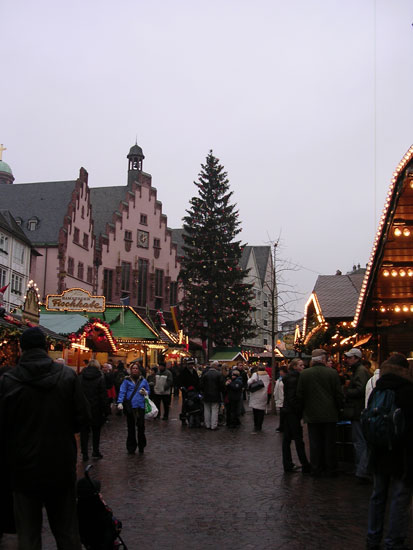
Christmas is the time of present-giving. In Europe people go shopping and enjoying the Christmas atmosphere to fairy-tale Christmas Markets that are usually organized in the center of the old town. They sell candied fruit and serve punch and mulled wine there. There is a smell of spice-cakes and gingerbread. The stalls are decorated with garlands and colorful lights.

The following photo was taken in a Christmas market in Frankfurt am Main in 2005.

Christmas market in Frankfurt

Open the photo in your photo editor and call AKVIS Enhancer Plug-in.

To correct the photo follow the instruction.

  • First, we should reveal details in the lower part of the photo. For this purpose set the value of the parameter Shadows to 45.
  • Secondly, increase the overall lightness of the photo by moving the slider Lightness to the right, approx. to 70.
  • And, finally, to reveal details in the light parts of the photo (these details can be lost due to the increase of overall lightness), increase the value of the parameter Highlights to 10.
Plug-in settings

It remains only to press the button Ok to apply the enhancement result and close the plug-ins's window.
the original photo Enhancement result
Before After

 
Comment fonctionne-t-il? Comment fonctionne-t-il?
AKVIS Enhancer Plug-In AKVIS Enhancer Plug-In
   — Zone de travail — Zone de travail
   — Mode Enhancer — Mode Enhancer
   — Mode Focus — Mode Focus
   — Batch Processing — Batch Processing
AKVIS Enhancer Stand-alone  (+HDR) AKVIS Enhancer Stand-alone (+HDR)
   — Zone de travail — Zone de travail
   — Mode Enhancer — Mode Enhancer
   — Mode Focus — Mode Focus
   — HDR mode — HDR mode
   — Image à grande gamme dynamique(HDR) — Image à grande gamme dynamique(HDR)
   — Post-traitement — Post-traitement
Exemples Exemples
   — Dans la rue — Dans la rue
   — Enfant dans le jardin — Enfant dans le jardin
   — Camion — Camion
   — Ville ancienne — Ville ancienne
   — À la campagne (HDR) — À la campagne (HDR)
   — Améliorer la netteté — Améliorer la netteté
   — Photo sombre d'une église — Photo sombre d'une église
   — Court de tennis — Court de tennis
   — Tir à l'arc — Tir à l'arc
   — Chapelle orthodoxe — Chapelle orthodoxe
   — Oranger — Oranger
   — Photo prise contre le soleil — Photo prise contre le soleil
   — Illustration technique — Illustration technique
   — La ville au crépuscule  — La ville au crépuscule
   — Photo sous-exposée — Photo sous-exposée
   — Un bébé avec un hochet — Un bébé avec un hochet
   — Les enfants de l'Afrique — Les enfants de l'Afrique
   — Raviver photos sans flash — Raviver photos sans flash
   — Enlever le brouillard — Enlever le brouillard
   — Le poète et les pigeons — Le poète et les pigeons
   — Le chat noir — Le chat noir


   Politique de Confidentialité | Plan du Site | Recherche | English  | Français  | Deutsch  | Español  | Português  | Italiano  | 日本語  | Pусский  | © 2004-2008, AKVIS Software Inc. Tous droits réservés.