Graphic software for Windows Mac graphic software  
AKVIS ニュースの購読を申し込むには, 電子メールアドレスを入力してください。
 
  
  プログラム     ダウンロード     サイバーショップ     チュートリアル     サポート     会社情報
en  fr  de  es  pt  it  jp  ru    
 

チュートリアル: AKVIS Coloriage

Colorize your memories


あいにく, このページは英語にだけ使用可能です。日本語のバージョンは遠からず出ります。

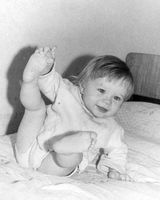
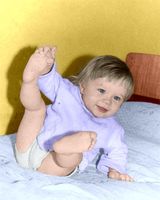
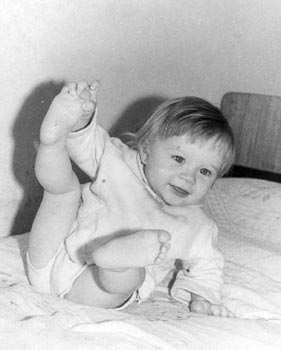
You can colorize this photo yourself using the half-finished materials that we give you. Download an archive containing the original image and the file with the strokes (*.strokes). Read the instruction here to see how AKVIS Coloriage works.

This photo was taken at a time when color photos where not so widespread, while black and white photography was available to everyone.

However, black and white photos can not convey the atmosphere of that time: the color of the wallpaper where you drew your first picture, the colors of your favourite blanket, the teddy bear that you loved so much.

Now you can take your black and white photo and use your memory to add colors to your recollections.

  • Step 1. Open the photo in your photo editing software.
  • a black and white photo of a child
  • Step 2. Call the AKVIS Coloriage plug-in. For this purpose in Adobe Photoshop select the menu item Filter AKVIS Coloriage; in Jasc Paint Shop Pro select the menu item Effects Plugins - AKVIS Coloriage; in Corel PHOTO-PAINT - select the menu item Effects AKVIS Coloriage.
  • Step 3. Draw an outline within every object with the color you have chosen for it.
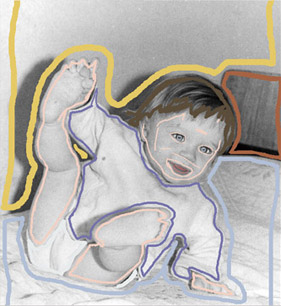
    Draw an outline within every object with the color you've chosen for it
  • Step 4. Press the button Colorize and you will see the colorized photo in the After tab.
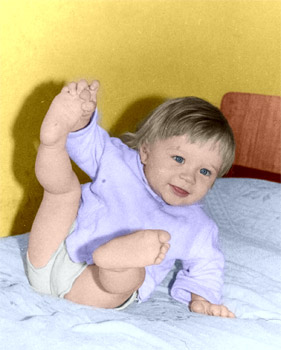
    the colorized photo of a child
  • Step 5. Apply the result to the image by pressing the button Apply the colorization to the image.
    the black and white photo of a child the colorized photo of a child
 
操作方法 操作方法
古い絵はがき 古い絵はがき
車体の色の変更 車体の色の変更
白黒写真をカラーに (婦人編) 白黒写真をカラーに (婦人編)
部分的な非彩色化 部分的な非彩色化
白黒写真をカラーに (紳士編) 白黒写真をカラーに (紳士編)
カナダ開拓者 カナダ開拓者
カラフルな背景の作成 カラフルな背景の作成
アニメ画の色付け アニメ画の色付け


   プライバシー | サイトマップ | Web サイトの検索 | English  | Français  | Deutsch  | Español  | Português  | Italiano  | 日本語  | Pусский  | © 2004-2008, AKVIS Software Inc. All rights reserved.