Graphic software for Windows Mac graphic software
AKVIS ニュースの購読を申し込むには, 電子メールアドレスを入力してください。
 
  
  プログラム     ダウンロード     サイバーショップ     チュートリアル     サポート     会社情報
en  fr  de  es  pt  it  jp  ru    
 

チュートリアル: AKVIS Coloriage

A Present for the Mother's day


あいにく, このページは英語にだけ使用可能です。日本語のバージョンは遠からず出ります。
Attention! You can get a free licence for an AKVIS program by translating texts from English to Japanese.
Please contact us at team@akvis.com.

We got this example from Robert Bates from Texas.

He decided to make a present to his mum for the Mother's Day - to colorize the B&W photo of his grandmother. He chose a black and white photo of his grandmother taken in early 40s in LeTulle Park, just outside of Bay City, near the Colorado River.
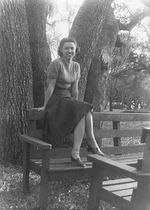
a black and white photo of the grandmother

To colorize the photo he did the following steps:

  • Step 1. Open the black and white photo in Jasc Paint Shop Pro 7.
  • Step 2. Call the AKVIS Coloriage plug-in by selecting the command Effects - Plugins - AKVIS - Coloriage.
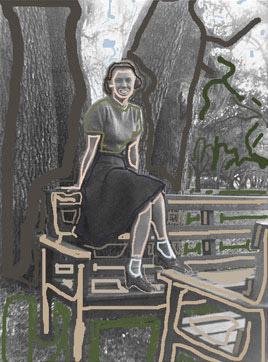
  • Step 3. Draw an outline within every object with the color you've chosen for it.
    Draw an outline within every object
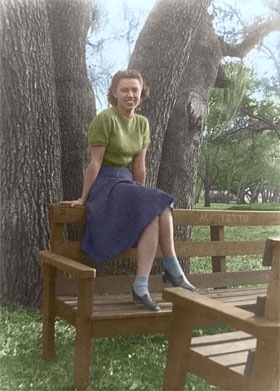
  • Step 4. Start the colorization process by pressing the button Colorize, the result will be shown in the After tab.
    the colorized photo
  • Step 5. Apply the colorization result to the image and close the plug-in window by pressing the button Apply the colorization result.
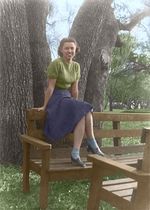
    The color photo

Robert's mother was happy to receive such a wonderful present, and was impressed that he had colorized his grandmother's clothes in her favorite colors.

 
操作方法 操作方法
   — 機能紹介 — 機能紹介
   — 操作方法 — 操作方法
操作例 操作例
   — 古い絵はがき — 古い絵はがき
   — 車体の色の変更 — 車体の色の変更
   — 白黒写真をカラーに (婦人編) — 白黒写真をカラーに (婦人編)
   — 部分的な非彩色化 — 部分的な非彩色化
   — 白黒写真をカラーに (紳士編) — 白黒写真をカラーに (紳士編)
   — カナダ開拓者 — カナダ開拓者
   — カラフルな背景の作成 — カラフルな背景の作成


   プライバシー | サイトマップ | Web サイトの検索 | English  |Français  |Deutsch  |Español  |Português  |Italiano  | 日本語  |Pусский  | © 2004-2009, AKVIS Software Inc. All rights reserved.