Colorear un retrato de William Gladstone: Coloriage y Paint Shop Pro
Este tutorial nos lo ha enviado David Kelly.
Hasta hace poco, para colorear digitalmente una foto en blanco y negro, se necesitaba tener buenos conocimientos prácticos de un programa de edición de imagen reconocido como PaintShop Pro, Photoshop, etc. Ahora, sin embargo, con la introducción del plugin AKVIS Coloriage para colorear digitalmente, la tarea es mucho más fácil, más rápida y mucho más divertida!
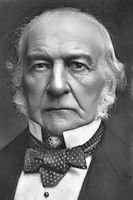
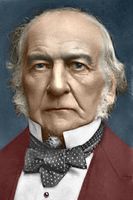
En este tutorial encontrará la manera en la que el plugin AKVIS Coloriage se utilizó en conjunto con PaintShop Pro 9 para crear una versión coloreada de una foto en blanco y negro original, previamente editada.
Como sigue, la foto original en tonos sepia antes de ser editada utilizando Paint Shop Pro 9. Otro plugin de AKVIS, MultiBrush, también se utilizó para el trabajo de edición.
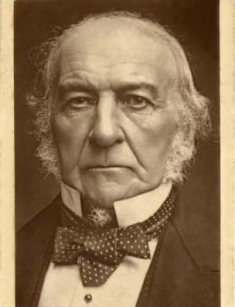
Imagen 01 - William Gladstone
Copyright © Roger Vaughan
A continuación, la misma fotografía mostrada en la Imagen 01 después de ser editada utilizando PaintShop Pro 9 en conjunto con el plugin AKVIS MultiBrush.
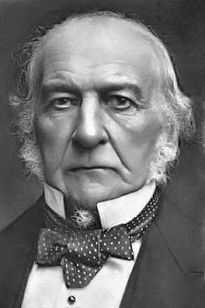
Imagen 02
Esta sección contiene una breve explicación de cómo el plugin AKVIS Coloriage se utilizó para crear una versión coloreada de la fotografía en blanco y negro (Imagen 02).
La primera foto fue abierta en Corel's Paint Shop Pro 9.
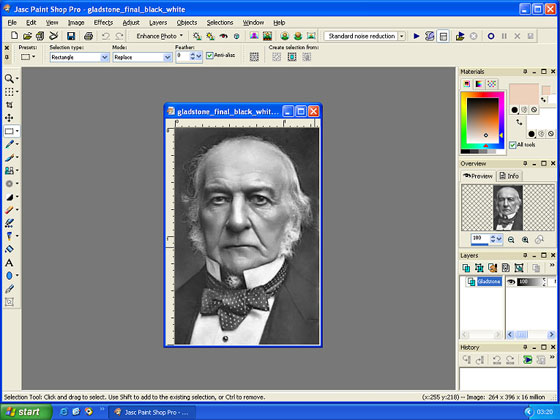
Imagen 03 - Área de trabajo de Paint Shop Pro 9
El plugin AKVIS Coloriage fue descargado por medio del menú Efectos de Paint Shop Pro: Efectos – Plugins – AKVIS – Coloriage.
La herramienta Lápiz  se utilizó para dibujar contornos dentro de todas las secciones de la foto, usando los colores seleccionados desde la Biblioteca de color. Estos contornos se llaman "Trazos". El área de trabajo con la foto y los trazos coloreados añadidos se muestran a continuación. Los "Trazos" de una fotografía se pueden guardar como archivos .strokes. Pueden volverse a cargar y utilizarlos con la misma foto para ediciones posteriores.
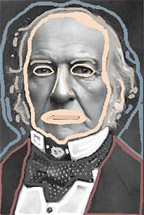
Imagen 04 - "Trazos" de AKVIS Coloriage
Después de haber completado una versión coloreada de la fotografía original utilizando los trazos, se puede hacer una pre visualización haciendo clic en el botón ejecutar  . Si están bien, los trazos pueden guardarse ahora. El efecto de coloreado queda aplicado a la imagen haciendo clic en el botón confirmar
  , ubicado arriba al lado derecho. El área de trabajo que muestra la nueva versión de "después" de coloreada la fotografía se puede ver a continuación.
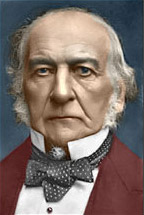
Imagen 05 - Vista del área
de trabajo "Después" de AKVIS Coloriage
La imagen 06 es la fotografía original en blanco y negro restaurada, y la imagen 07 muestra la versión completa coloreada AKVIS Coloriage.
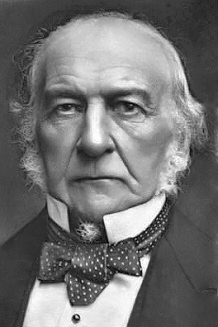
Imagen 06
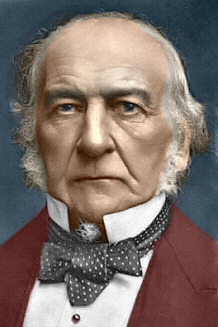
Imagen 07
Para cualquier persona con interés en el coloreado digital de fotos, que posea un editor de imagen compatible, el plugin AKVIS Coloriage es uno de esos adicionales "que se deben tener", y no se necesita ser un experto en imagen digital para usarlo con éxito.
Como con la mayoría de las fotos en blanco y negro que son coloreadas digitalmente, los colores utilizados con AKVIS Coloriage son subjetivos. Para elegir más fácilmente el color "correcto", el plugin incluye una Biblioteca con catorce categorías de color: Gente, Césped, Hojas, Madera, Piedras, Ladrillos, Cielo, Nubes, Agua, Metales, Papel, Tierra, Vidrio y Tela. Los colores también pueden elegirse utilizando el plugin "Carta de Colores".
Este artículo sólo da una muy breve descripción del plugin AKVIS Coloriage. Para leer instrucciones más detalladas, por favor haga clic aquí.
Coloriage AI v. 15.7 - Prueba gratuita de 10 días
