ArtWork para pintores estudantes
Neste este artígo, o autor Dale McGee, BFA nos diz como melhorar nossas habilidades na pintura utilizando AKVIS ArtWork. Poderia ser de útil para os jovens artistas e professores de arte.
Tenho uma licenciatura em Belas Artes com uma grande educação artística importante e embora não esteja ensinando na atualidade, ideias de como esse programa podería ser utilizado em um sala de aula viem a mente a cada momento. Os estudantes do nivel secundario tem dificuldades em compreender o propósito e a beleza da abstração devido a sua falta de experiencia visual.
Uno dos problemas mais comuns que poderia sabotar una pintura é quando um artista se centra demasiado nos pequenos detalhes, como uma árvore em uma paisagem. Q uando isso acontece, é fácil perder a atenção de todo a imagem e como tudo se encaixa qual um quebra-cabeças. Estas peças incluem elementos tais como o uso de padrões, línhas e formas para criar uma sensação de unidade na obra.
A planificação previa de uma pintura é essencial para alcançar os efeitos desejados. Trata-se em pensar no conceito inicial ou ideia, o estilo em que se pintará, o realismo ou a abstração, o estado de animo que se quer representar, por exemplo, a suavidade e a gentileza com tons análogos de azul e verde, as representações dinámicas utilizando cores complementáres.
O uso de AKVIS ArtWork podería proporcionar aos estudantes uma visão de como o realismo se pode reduzir a beleza e a simplicidade da linha, a forma e a cor. Uma vez feito isso, se permitiría concentrarse nos principios da arte em seu trabalho, tais como o ritmo, a repetição, a cor, a composição e o tom.
O simples processo de ajustar os efeitos visuais pode levar a novas idéias e mais tentar compreender qual a imagem e como ela será exibida. Com a ferramenta Simplicidade e muito fácil de fugir do detalhe para ver as possibilidades dos blocos de cores, o que gostaria de mudar ou manter e quais são as melhores áreas para um ponto focal. Há até uma fantástica ferramenta, Fonte de luz, para mudar a direção da luz. A guia Pintura é maravillosa para experimentar com a duração e/ou a intensidade das pinceladas por as que un podería optar para trabalhar. En resumo, AKVIS ArtWork é absolutamente ideal para o uso na planificação de una pintura.
Este enfoque sería especialmente satisfatorio para aqueles estudantes que não tem a capacidade de reproduzir o realismo e que, por tanto, pego tentando. Também sería ideal para a educação da perspectiva j á que os estudantes poderiam trabalhar com maior detalhe n o p r i m e i r o p l a n o, e logo utilizando AKVIS teriam oportunidade de compreender como a distancia torna-se m e n o s detalhada. Eu posso imaginar uma sala de aula cheia de artistas em b o t ã o, utilizando este programa para jogar com idieas para aproximação da natureza morta diante deles, utilizando Fonte de luz, Direção das l i n h a s e Intensidade das pinceladas. Só "jogar" com a imagem lhes proporciona ideias sobre como abordar a natureza morta em seu trabalho as possibilidades para o uso de AKVIS são infinitas e muito inspiradoras.
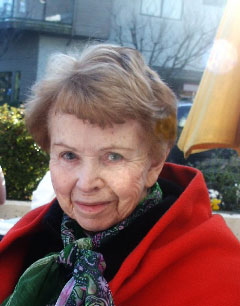
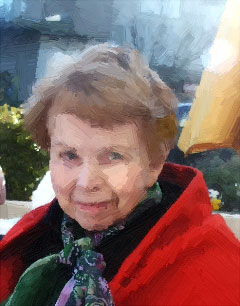
Exemplo №1: O retrato
Com a ajuda de AKVIS Eu tenho sido capaz de simplificar as ferramentas de detalhe e usando Direção de traços e Intensidade do tracejado, Eu ajustei as imagens para mostrar menos detalhes e eu aumentei a área de luz, meios e tons escuros. Posso até ver as cores em sombras. Para alcançar isso, Eu tenho usado um guia visual para introduzir-me a estes retratos e concentrando na forma e a cor no lugar de ficar preso em detalhes. É um pouco como o truque de um artista com um olho estrábico que é capaz de bloquear os detalhes. Em vez de fazer isso, eu tenho a imagem real simplificada a qual recorrer. Agora me sinto mais confiado e preparado para criar esses retratos e estou muito entusiasmado em começar com eles.
| |
|
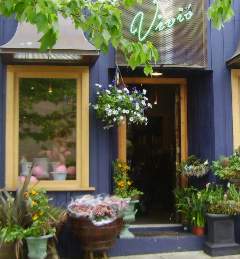
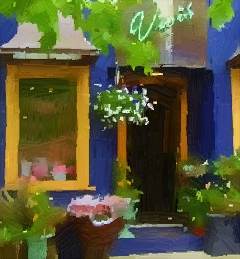
Exemplo №2: Cartão postal
Este delicioso café me inspirou a planejar uma pintura. Não queria que a pintura fosse uma cópia da fotografia. Em vez disso, eu queria capturar a essência e charme desta pequena estrutura que chamou minha imaginação. Usando o programa AKVIS tive a oportunidade de experimentar com diferentes composições. Eu escolhi este quadro para planejar minha pintura porque eu queria enfatizar as formas azuis vibrantes. A cor laranja das flores é um elogio para o azul, significado que quando você está ao lado do outro, o laranja / amarelo vai olhar mais azul vibrante e vice-versa. Eu não queria pintar flores e folhagem com detalhes microscópicos como eles iriam focalizarme em cor e forma. Assim, com AKVIS eu sou capaz de reduzir o toque de cor que eu queria. Esta cor também é refletido nas portas e janelas, por isso tudo parece ótimo. A vegetação em flores superiores e brancas penduradas adicionar um contraste e acentuar a todas as composições. Com a ajuda de AKVIS eu tenho sido capaz de encontrar um foco para a minha pintura eo melhor de tudo, ele teve pouco tempo para fazer. Um trabalho como eu fiz com uma caixa como este le proporcionaría a un profesor de arte una maravillosa lección de animación en color y composición.
| |
|
Eu encontrei este incrível programa um pouco por acidente enquanto procura ajuda artística em diferentes sites. Eu tentei muitos programas diferentes, mas assim que eu experimentei com a versão de avaliação gratuita do AKVIS ArtWork, eu sabia que isso era o que eu precisava. Fiquei muito impressionado com o controle que ele tinha no uso das ferramentas e facilidade de uso, sem complicações. Eu sempre achei mais confortável com o pincel na mão em vez de usar programas complicados e demorados. Palavras não podem expressar o quanto estou feliz por ter encontrado um programa para me ajudar com os obstáculos no meu caminho criativo. Graças AKVIS!
ArtWork v. 15.1 - Teste gratuito 10 dias
