Graphic software for Windows Mac graphic software  
AKVIS ニュースの購読を申し込むには, 電子メールアドレスを入力してください。
 
  
  プログラム     ダウンロード     サイバーショップ     チュートリアル     サポート     会社情報
en  fr  de  es  pt  it  jp  ru    
 

チュートリアル: AKVIS Enhancer

A poet and doves


あいにく, このページは英語にだけ使用可能です。日本語のバージョンは遠からず出ります。


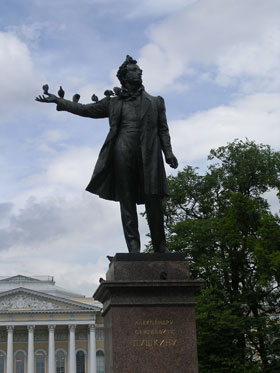
The photo has been taken by our colleague during her stay in St.Petersburg. Her attention was drawn to the pigeons that settled down on the monument of the most renowned Russian poet Alexandre Pushkin. The pigeons made themselves comfortable using his outstretched arm as a perch.

The photo came out underexposed, therefore Pushkin's figure and the cheeky pigeons form one silhouette.

A monument to Pushkin: an unerexposed photo

We will apply the AKVIS Enhancer plug-in to improve the level of detail of the photo and "separate the wheat from the chaff".
  • Step 1. Launch your photo editor and open the photo in it.
  • Step 2. Call the AKVIS Enhancer plug-in. The image will be processed at the default values.
  • Step 3. As the photo is dark we should clarify only the dark areas of the picture. For this purpose we will move the slider Shadows to the right to 90 and the slider Lightness to 70. You can leave other parameters as they are.
    AKVIS Enhancer program window

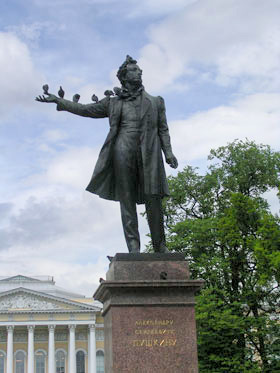
    After this simple correction the light areas of the photo have not changed (for example, the clouds), while the dark areas have become lighter and one can discern all the details of the monument. The tree behind the monument has become lighter and now it has a natural green color.

  • Step 4. Apply the exposure correction result by pressing the button Ok and compare the two photos.
    the original underexposed photo of Pushkin's monument the photo after the exposure  compensation
    Before Enhancer After Enhancer
 
AKVIS Enhancer プラグイン AKVIS Enhancer プラグイン
   — ワークスペース — ワークスペース
   — Enhancerモード
 — Enhancerモード
   — フォーカス モード
 — フォーカス モード
   — バッチ処理 — バッチ処理
AKVIS Enhancer - HDR AKVIS Enhancer - HDR
   — ワークスペース — ワークスペース
   — Enhancerモード
 — Enhancerモード
   — フォーカス モード — フォーカス モード
   — 連続した写真の処理(HDRモード) — 連続した写真の処理(HDRモード)
   — HDRIとは? — HDRIとは?
操作例 操作例
   — 教会 — 教会
   — 街路 — 街路
   — 庭で遊ぶ子供 — 庭で遊ぶ子供
   — 大型トラック — 大型トラック
   — 古代都市 — 古代都市
   — シカ — シカ
   — 高地の風景(HDR) — 高地の風景(HDR)


   プライバシー | サイトマップ | Web サイトの検索 | English  | Français  | Deutsch  | Español  | Português  | Italiano  | 日本語  | Pусский  | © 2004-2008, AKVIS Software Inc. All rights reserved.