Graphic software for Windows Mac graphic software  
Entrar seu e-mail para subscrição em novidades.
 
  
  Produtos     Download     Online Store     Tutorial     Suporte     Quem Somos
en  fr  de  es  pt  it  jp  ru    
 

Tutorial: AKVIS Retoucher

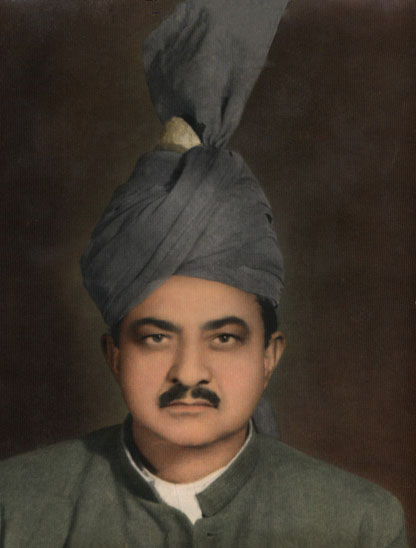
Removes stains from the grandfather's photo


Neste momento algumas páginas são disponíveis somente em Inglês ou em Espanhol.

The tutorial was created by Afaq Saeed.


The most powerful and perfect Scratches, Creases, Stains and also Dust Removal is AKVIS Retoucher Filter. I found it on web, when I was searching for perfect scratch removal software. Then I found this AKVIS Retoucher Software free trial version. It was very useful and it helped me very much in removing defects from my grandfather's picture.

Let me tell you how I used it.

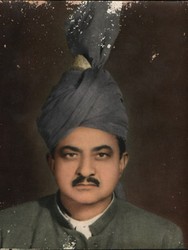
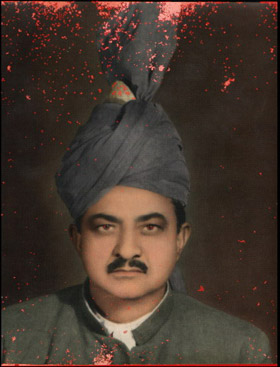
  • Step 1. First of all I opened my grandfather's photo in Adobe Photoshop. The photo was much scratched and it was not easy for me to edit it with Adobe Photoshop's tools because, when I used Healing Brush and Stamp tools I sometimes found some dark spots on my grand father's photo. So I decided to use AKVIS Retoucher. Before you can apply Retoucher you should select all imperfections. I switched to the Quick Mask Mode and start painting over the scratches with Adobe Photoshop's Brush tool. I marked every scratch with brush, so that my grandfather's photo look looked this.
    original photo of my grandfather Select imperfections in Quick mask mode
  • Step 2. Then I switched to Standard Mode for the selection of my photo's defects and I inversed the selection by going under Select and then clicked on Inverse.
    Inverted selection
  • Step 3. At this stage I went to Filter - AKVIS and then Retoucher.
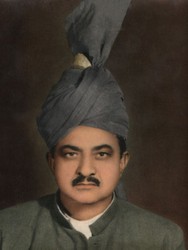
    AKVIS Retoucher: the defects are highlighted
  • Step 4. Then I launched the restoration process by pressing launch the restoration process.
    AKVIS Retoucher: the retouching is over
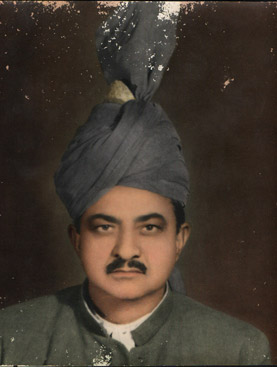
  • Step 5. After this I pressed the button Apply the retouching result to apply the result to the image and come back to the Photoshop's workspace. Then I used Adobe Photoshop's Healing Brush tool a bit for the final touch-up. I am really very happy with this. Amazing, it was a great job by AKVIS software.
    The retouched photo of my grandfather
 
Como funciona Como funciona
Foto velha Foto velha
Uma Foto do bebé Uma Foto do bebé
Tirar a data Tirar a data
Um geólogo no bosque Um geólogo no bosque
Retocar uma foto com Retoucher e Stamp Retocar uma foto com Retoucher e Stamp
A Fotografia velha duma família A Fotografia velha duma família
A Foto dum menino A Foto dum menino
Reparação duma foto de ciganos Reparação duma foto de ciganos
Com um sorriso Com um sorriso
Retoque duma imagem rasgada Retoque duma imagem rasgada
Reparação da foto dos meninos Reparação da foto dos meninos
Uma criança feliz Uma criança feliz
Uma fotografia em preto e branco Uma fotografia em preto e branco
Video restauração Video restauração
Family archives restoration Family archives restoration


   Política de privacidade | Mapa do Site | Pesquisar na site | English  | Français  | Deutsch  | Español  | Português  | Italiano  | 日本語  | Pусский  | © 2004-2008, AKVIS Software Inc. Todos os direitos reservados.