Imagens de alta faixa dinâmica (HDR)
Quando você fotografa uma cena que consiste tanto de uma luz forte quanto de sombras profundas você percebe que os detalhes de ambas são perdidos. Imagine ficar em um quarto escuro e olhar para fora de uma janela - você verá apenas um detalhe - ou a visão fora da janela ou o interior do ambiente. Contudo, existe um método para visualizar os detalhes em cada parte da imagem.
HDRI (High Dynamic Range Imaging - Imagens com alta faixa dinâmica) é uma tecnologia que expande o ganho dinâmico de uma imagem e mostra detalhes tanto em áreas de sombra quanto em áreas densamente iluminadas.
Faixa dinâmica é uma gama de valores de brilho que podem ser gravados em media (filme, chapas fotográficas, e papel fotográfico) ou em matriz eletrônica de uma câmera digital.
Em contraste com as câmeras modernas que tem um alcance dinâmico baixo, olho humano está apto a discernir muito mais tons de cores e detalhes em um objeto sem nenhuma iluminação.
A tecnologia HDRI minimiza esta discrepância em uma combinação de várias tomadas da mesma imagem para alcançar uma imagem bastante próxima daquela que o fotógrafo vê com seus olhos. Contudo, monitores, assim como as câmeras tem um ganho dinâmico mais baixo e podem não reproduzir uma imagem-HDR não oferecendo assim nenhuma vantagem. Por isso que uma tecnologia chamada Mapa de tom (Tone Mapping) é aplicada para comprimir o ganho dinâmico de uma Imagem_HDR sem degradar a qualidade da mesma. A imagem resultante é chamada LDR (baixa faixa dinâmica) imagem, mas parece muito melhor do que a imagem original.
A diferença é evidente quando você fotografa com altos níveis de contraste.
Compare as tomadas originais.
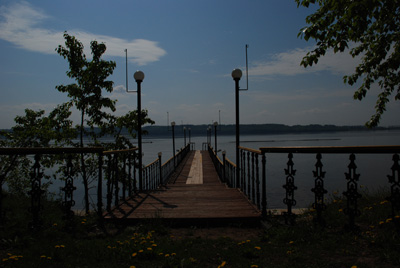
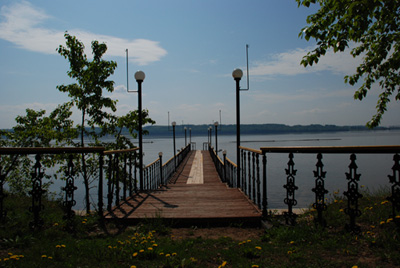
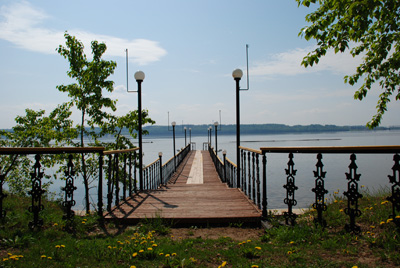
Com o resultado do processamento HDRI:
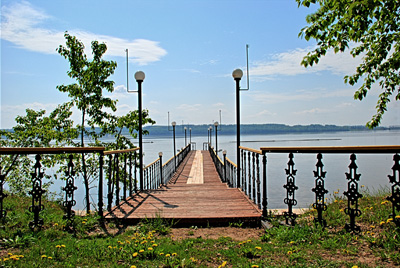
Anteriormente, havia a necessidade da utilização de filtros gradientes para fotografar ou várias ferramentas do Adobe Photoshop (mascaras, camadas) para conseguir uma imagem semelhante.
Com o evento da tecnologia HDRI o processo foi simplificado. Agora é suficiente tirar tirar uma série de fotos de um único e mesmo objeto utilizando diferentes ajustes de exposição, e carregar as imagens para o AKVIS HDRFactory e combina-las e uma única imagem.
HDRFactory v. 8.1 - Teste gratuito 10 dias
