Como fotografar com níveis diferentes de exposição
Para gerar uma Imagem-HDR você precisa de uma série de fotos da mesma cena tiradas com diferentes níveis de exposição. Isto é possível pelo Modo Manual (Manual mode) ou Triangulação Automática (Automatic Bracketing).
Vamos observar a segunda opção detalhadamente. Siga a instrução abaixo para tirar uma série de fotos composições de exposição utilizando a triangulação automática:
- Regule sua câmera digital para modo triangulação automática (AEB). Geralmente, esta regulagem permite a tomada de três fotos: normal, subexposição e super exposição. Algumas câmera digitais permitem tirar 5 fotos ou mais.
- Regule o desempenho das exposições para a triangulação automática. Recomendamos os seguintes valores: -2, 0,+2.
- Regule o parâmetro ISO para um valor maior que 100; senão, as fotos poderão conter muitas distorções, os quais dificultarão o manuseio.
- Regule o tamanho da imagem para o máximo.
- Escolha o objeto a ser fotografado. Quando fotografar exteriores você poderá encontrar alguns problemas. Acena raramente é imóvel. Se tiver pessoas e carros em movimento, aguarde até que saiam da cena. Para folhas balançando ao vento, não há como evitar, mas isto não é um problema critico - pois não causará nenhum impacto considerável no resultado. Se as árvores em si estiverem sacudindo, é melhor retardar a foto deste local, pois os galhos podem aparecer duplicados na imagem final.
- Fixe a câmera em um tripé ou em uma superfície estável. Se fizer isto o efeito de duplicidade na foto, será minimizado.
- Tire uma série de fotos.
- Transfira as fotos para o computador. Não altere as fotos.
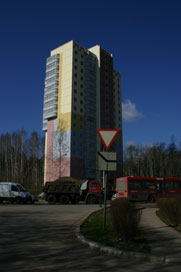
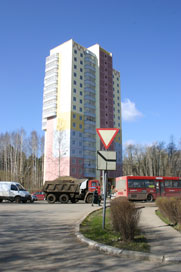
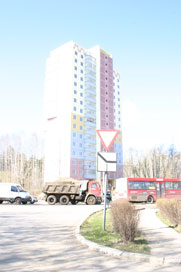
Fotos das configurações de exposição -2, 0 e 2
HDRFactory v. 8.1 - Teste gratuito 10 dias
