Graphic software for Windows Mac graphic software  
Ingrese su email para suscribirse a la lista de AKVIS.
 
  
  Productos     Descargar     Tienda Online     Tutorial     Apoyo técnico     Compañia
en  fr  de  es  pt  it  jp  ru    
 

Tutorial: AKVIS Retoucher

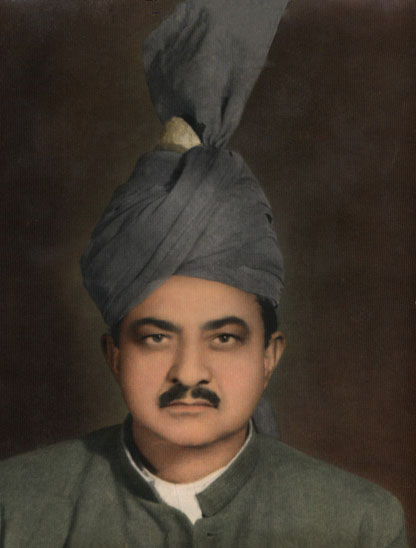
Removes stains from the grandfather's photo


Esta información está disponible solamente en inglés. La version española aparecerá pronto.

The tutorial was created by Afaq Saeed.


The most powerful and perfect Scratches, Creases, Stains and also Dust Removal is AKVIS Retoucher Filter. I found it on web, when I was searching for perfect scratch removal software. Then I found this AKVIS Retoucher Software free trial version. It was very useful and it helped me very much in removing defects from my grandfather's picture.

Let me tell you how I used it.

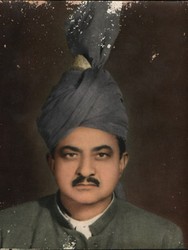
  • Step 1. First of all I opened my grandfather's photo in Adobe Photoshop. The photo was much scratched and it was not easy for me to edit it with Adobe Photoshop's tools because, when I used Healing Brush and Stamp tools I sometimes found some dark spots on my grand father's photo. So I decided to use AKVIS Retoucher. Before you can apply Retoucher you should select all imperfections. I switched to the Quick Mask Mode and start painting over the scratches with Adobe Photoshop's Brush tool. I marked every scratch with brush, so that my grandfather's photo look looked this.
    original photo of my grandfather Select imperfections in Quick mask mode
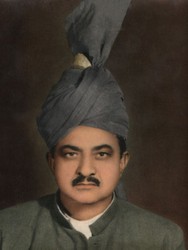
  • Step 2. Then I switched to Standard Mode for the selection of my photo's defects and I inversed the selection by going under Select and then clicked on Inverse.
    Inverted selection
  • Step 3. At this stage I went to Filter - AKVIS and then Retoucher.
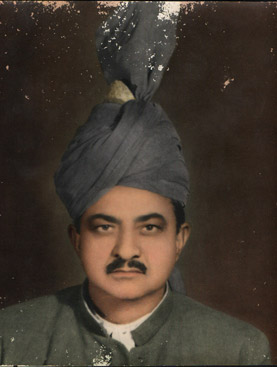
    AKVIS Retoucher: the defects are highlighted
  • Step 4. Then I launched the restoration process by pressing launch the restoration process.
    AKVIS Retoucher: the retouching is over
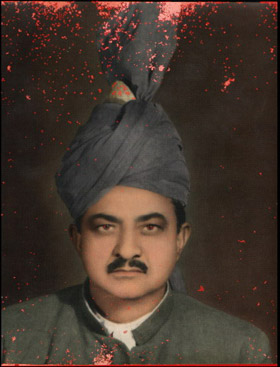
  • Step 5. After this I pressed the button Apply the retouching result to apply the result to the image and come back to the Photoshop's workspace. Then I used Adobe Photoshop's Healing Brush tool a bit for the final touch-up. I am really very happy with this. Amazing, it was a great job by AKVIS software.
    The retouched photo of my grandfather
 
Cómo funciona Cómo funciona
Foto vieja de un joven Foto vieja de un joven
Foto del niño Foto del niño
Quitar la fecha de una fotografia Quitar la fecha de una fotografia
Foto estropeada del viajero Foto estropeada del viajero
Retocar una foto (Retoucher + Stamp) Retocar una foto (Retoucher + Stamp)
Retocar una foto familiar Retocar una foto familiar
Retocar un retrato Retocar un retrato
Foto histórico: campamento gitano Foto histórico: campamento gitano
Sonrisa Sonrisa
Restaurar una foto rota Restaurar una foto rota
Restaurar una foto de un chico Restaurar una foto de un chico
Niño feliz Niño feliz
Foto en blanco y negro Foto en blanco y negro
Restaurar video Restaurar video
Para el día de la Madre Para el día de la Madre
Familia ucraniana Familia ucraniana
Prepress processing (for polygraphy) Prepress processing (for polygraphy)
Un daguerrotipo Un daguerrotipo


   Política de privacidad | Mapa Web | Buscar | English  | Français  | Deutsch  | Español  | Português  | Italiano  | 日本語  | Pусский  | © 2004-2008, AKVIS Software Inc. Todos los derechos reservados.