Clone Stamp
The Clone Stamp tool  can clone a part of an image from one part and into another while maintaining the original color range, shadows, and other characteristics of the cloned part. Press S to quickly select this tool.
To clone an object, first select the area to be cloned: do this by first holding down Alt (Option on Mac), and then clicking on the area from which the clone will be taken.
Once the reference point is defined, place the cursor over the area you wish to place the clone. Left-click to apply the clone. When you left-click a cross-shapped cursor will appear over the source image, identifying the original fragment.
The tool's parameters will be shown in a floating box over an image (by right-clicking the mouse) and also in the Settings Panel.
To change the value of a parameter, enter a numerical value in the parameter's field and press Enter (Mac: Return) or adjust the slider.
- Size (1-1000). The maximum diameter of the source used for cloning (in pixels).
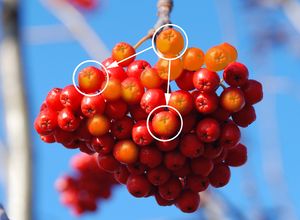
- Hardness (0-100). The degree of blurriness of the fragment's edges. At higher values of this parameter, the less the fragment's border interacts with the background. At values near 100% the border between the fragment and the image is very distinct; at lower values the border between these areas will be smoother.
-
Blend Mode. It defines how the cloned fragment blends with the background. The program provides 16 blend modes.
Cloning with Different Blend Modes 

Normal Mode Overlay Mode - Opacity (1-100). The opacity of the fragment in relation to the background. This parameter affects the opacity of the fragment where it is stamped: at lower values, the fragment is paler and its interaction with the background is greater.
- Aligned check-box. This option sets how the fragment is cloned. When the check-box is activated, a single clone will be created using information from around the selected source: in this case each time the left mouse button is pressed a clone will be selected from the relevant area. When the check-box is not activated, each time the mouse button is released the cursor returns to the source area, and new clone fragments are created from this same area.
Cloning Methods 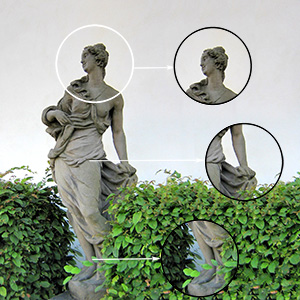
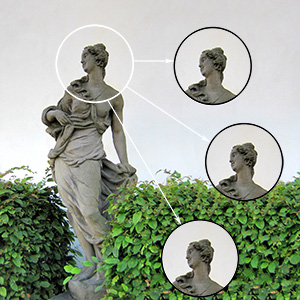
Aligned check-box is enabled Aligned check-box is disabled - Activating the Flip Horizontal check-box allows a clone to be mirrored along the standing axis, i.e. interchanging the left and right sides.
-
Activating the Flip Vertical check-box mirrors a clone by turning the image upside down.
Flipping Clones 

Original Image Using Clone Stamp 

Flip Horizontal Flip Vertical -
Scaling (20-400%). The size of the clone relative to the original fragment.
Clone Scaling 

Scaling = 20% Scaling = 110%
| Cloning Red Berries With Stamp of the Same Size | |
 |
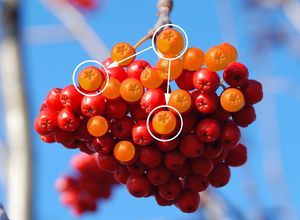 |
| Hardness = 30% | Hardness = 100% |
| Cloning Glass Eggs (example by Gun Legler) | |
 |
 |
| Opacity of the Clone = 40% | Opacity of the Clone = 100% |