Graphic plugins for Windows Mac graphic plugins  
Please enter your email to be kept posted on updates and discounts:
 
  
  Products     Download     Online Store     Tutorial     Support     About Company
en  fr  de  es  pt  it  jp  ru    
 

Tips & Tricks

Rotation and flipping in Paint Shop Pro


To rotate an image in Paint Shop Pro you can use commands from the submenu Image - Rotate.

You can apply the following commands:

  • Rotate Clockwise 90 - it allows rotating the image on 90 degrees clockwise.
  • Rotate Counter-clockwise 90 - it allows rotating the image on 90 degrees anticlockwise.
  • Free Rotation - the command allows rotating the image on an arbitrary angle. For this purpose:
    • Step 1. select the command from the menu;
    • Step 2. make sure that the check box All layers is activated;
    • Step 3. specify the direction of the rotation - to the left or to the right;
    • Step 4. enter the value of the rotation angle in degrees;
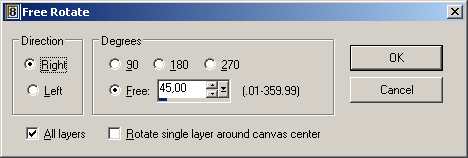
    • Arbitrary rotation in PSP
      Step 5. press the button OK.

To flip an image horizontally in PSP you can use the command Flip from the menu Image. Apply this command when you want to turn the image upside down.

If you want to mirror the image as to the standing axis, you can use the command Mirror from the menu Image. Apply this command if you want to interchange the left and the right part of the image.

 
Tips and Tricks Tips and Tricks
Paint Shop Pro selection Tools Paint Shop Pro selection Tools
Paint Shop Pro layer transformation Paint Shop Pro layer transformation
Paint Shop Pro  rotation and flipping Paint Shop Pro rotation and flipping
Paint Shop Pro  changing image resolution Paint Shop Pro changing image resolution
Paint Shop Pro changing image size Paint Shop Pro changing image size
Photo-Paint selection Tools Photo-Paint selection Tools
Photo-Paint rotation and flipping Photo-Paint rotation and flipping
Photo-Paint image resolution Photo-Paint image resolution
Photo-Paint changing image size Photo-Paint changing image size
PhotoImpact installing plug-ins PhotoImpact installing plug-ins
GIMP adding Photoshop plug-ins GIMP adding Photoshop plug-ins


   Privacy Policy | Site Map | Search | English  | Français  | Deutsch  | Español  | Português  | Italiano  | 日本語  | Pусский  | © 2004-2008, AKVIS LLC. All rights reserved.