Photo To Drawing with AKVIS Draw: How It Works


Subscribe to News:
   Products   Download   Purchase   Tutorial   Support   Company     Customer Room
en  fr  de  es  pt  it  jp  ru  
 

Tutorial: AKVIS Draw

How It Works


AKVIS Draw converts your photo into a pencil sketch giving it a hand drawn look. Equipped with a number of the ready to use presets and adjustable parameters, the software renders various esquisse styles. The program produces both B&W and color drawings.

The software is available as a standalone program and as plugin for photo editors, in versions for Windows and Mac OS X. The functionality of the program depends on the license type. Consult the comparison table.
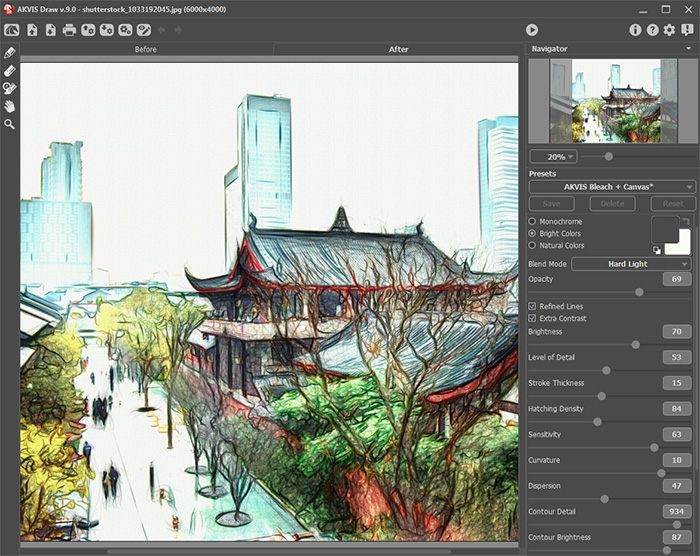
Read our tutorial to learn how to make a line art drawing from a photo:


How It Works

 
How It Works How It Works
   — Workspace — Workspace
   — How To Use The Program — How To Use The Program
   — Effect Parameters — Effect Parameters
   — Adding Text — Adding Text
   — Presets — Presets
   — Preferences — Preferences
   — Batch Processing — Batch Processing
Examples Examples
   — Drawings in the Margins — Drawings in the Margins
   — AKVIS Draw vs AKVIS Sketch — AKVIS Draw vs AKVIS Sketch
   — Pencil Drawings Gallery — Pencil Drawings Gallery
   — Creating a Pencil Portrait — Creating a Pencil Portrait


Draw v. 1.1 - Free 10-day Trial:  Download


back to top


   Privacy Policy | Search | Contact Us    
   Twitter | Facebook | YouTube | Forum    
| English  | Français  | Deutsch  | Español  | Português(Br)  | Italiano  | 日本語  | Pусский  | © 2004-2014 AKVIS. All Rights Reserved.
