Fireworks
The author of this tutorial is Héctor Calle E.
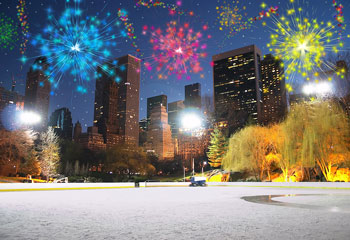
Hong Kong… a cosmopolitan city with a huge population. Its citizens are always busy, but they like celebrations too. In the calendar of the city there is a day that unites people. On this day numerous fireworks sparkle in the night sky overshining the stars.
Let's add fireworks to this night picture of Hong Kong using AKVIS LightShop plug-in.
- Passaggio 1. Open the image in Adobe Photoshop or other photo editor compatible with AKVIS plug-ins.
- Passaggio 2. Call the plugin from the menu of the photo editor Filter > AKVIS > LightShop. Choose a suitable preset in the plugin window, for example, No. 03.
Press the button
to see how it will look on the image. If you are not satisfied, you can change the settings in the Effect settings window (double-click on this preset). Then press the button again and see the result. You can change the parameters of the preset several times to achieve the necessary result. Below is the picture with the chosen fireworks.
Press the button to apply the result to the image. But one firework is not enough for this big city. Let's make more.
- Passaggio 3. Call the plugin again Filter > AKVIS > LightShop.
We need diversity so we choose a different preset, this time - No. 27.
Set the parameters of the preset again. Repeat Passaggio 2. To see the result press the button , press the button to apply the result and close the plugin window.
- Passaggio 4.
Repeat the previous steps several times to make the photo more colorful and cheerful.
The author used SAMPLES N 18, 43, 25, 42.
Now the photo has a festive look!
| |
|