Tomar fotos con distintos parámetros de exposición
Para generar una imagen HDR hay que tener una serie de fotografías de la misma escena tomadas con distintos ajustes de exposición. Es posible utilizar el modo manual o el modo de Bracketing automático.
Vamos a ver la segunda opción en detalles. Siga las instrucciones para tomar una serie de fotografías con distintos parámetros de exposición utilizando el bracketing automático:
- Elija en su cámara digital el modo de bracketing automático (AEB). En general, este modo le permite tomar tres fotografías consecutivamente: normal, subexpuesta y sobreexpuesta. Algunas cámaras digitales permiten tomar cinco o más fotografías.
- Fije los rangos de exposición para el bracketing automático. Le recomendamos los siguientes valores: -2, 0,+2.
- Fije el parámetro ISO a un valor no mayor de 100. De lo contrario, las fotos pueden tener demasiado ruido.
- Elija la calidad y tamaño máxima de imagen.
- Elija el sujeto para su fotografía. Cuando las fotos son tomadas en exteriores es posible que haya los objetos que se mueven. Si hay personas y automóviles en movimiento, espere hasta que abandonen la escena en la toma de fotografías. En lo que se refiere a las hojas que tiemblan con el viento, no hay forma de cambiarlo, pero no es crítico - no tendrá un impacto considerable en el resultado. Si los árboles son los que se sacuden o menean, es mejor retrasar la toma de la fotografías, porque las ramas de los árboles pueden duplicarse en la imagen final.
- Coloque la cámara en un trípode o una superficie estable. Si fija la cámara el efecto borroso en la fotografía provocado por el movimiento involuntario de las manos será minimizado.
- Tome una serie de fotografías.
- Transfiera las fotografías al ordenador sin modificarlas o alterarlas.
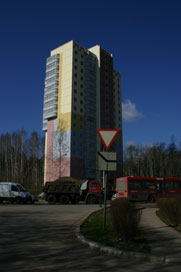
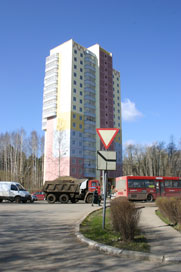
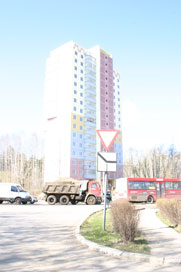
Fotos de los parámetros de exposición -2, 0 y 2
HDRFactory v. 8.1 - Prueba gratuita de 10 días
