Turn Your Pictures in Charcoal and Chalk Drawings with AKVIS Charcoal


Subscribe to News:
   Products   Download   Purchase   Tutorial   Support   Company     Customer Room
en  fr  de  es  pt  it  jp  ru  
 

Tutorial: AKVIS Charcoal

How It Works


AKVIS Charcoal is designed to simulate drawing made with charcoal and chalk. It turns any photo into a stunning work of art. Using the program you can create professional-looking expressive black and white drawings. It's also possible to play with colors to achieve outstanding artistic effects, such as sanguine.

The software is available as a standalone application and as plugin for photo editors, for Windows and Mac. The functionality depends on the license type. Consult the comparison table for detailed information.
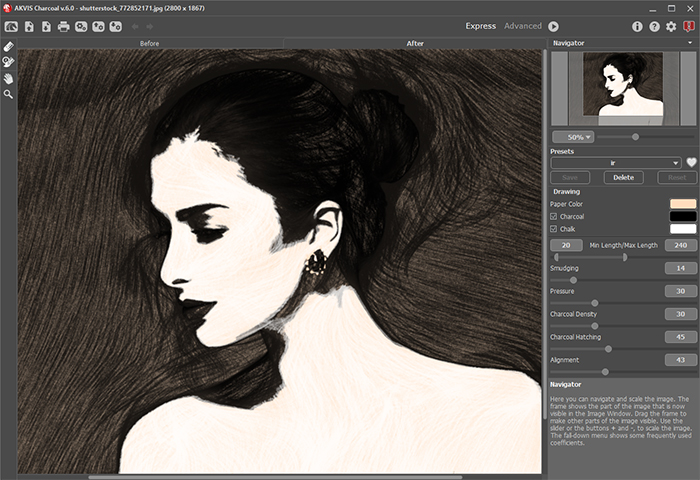
Read our tutorials to learn how to create a charcoal drawing from a photo:

How It Works

 
How It Works How It Works
   — Workspace — Workspace
   — Using the Program — Using the Program
   — Drawing — Drawing
   — Timeline — Timeline
   — Toolbar — Toolbar
   — Text — Text
   — Canvas — Canvas
   — Presets — Presets
   — Preferences — Preferences
   — Batch Processing — Batch Processing
Examples Examples
   — Gallery of Works — Gallery of Works
   — Charcoal Sketch — Charcoal Sketch


Charcoal v. 1.0 - Free 10-day Trial:  Download


back to top


   Privacy Policy | Search | Contact Us    
   Twitter | Facebook | YouTube | Forum    
| English  | Français  | Deutsch  | Español  | Português(Br)  | Italiano  | 日本語  | Pусский  | © 2004-2014 AKVIS. All Rights Reserved.
