[チャンネル]パレット
[チャンネル] パレットは Home Deluxe版とBusiness版 のみで利用できる機能です。
このパレットでは、イメージを様々なチャンネルで表示/編集することができます。チャンネルは、色要素の明るさ情報を含むハーフトーンのイメージです。
チャンネル リストには、 1) 合成イメージ (RGB、CMYK、Lab、グレースケール)、 2) 色モードの個々のチャンネル (例えば、 RGB であれば、赤、緑、青の各チャンネル)、 3) 現在のラスター レイヤーの透明度 (アルファ チャンネル)、 4) 現在選択しているチャンネル、が含まれています。
チャンネル名の左には、視覚インジケータ(ラジオボタン)と変更した場合の結果がサムネイルとして表示されます。
![[チャンネル]パレット: CMYK チャンネル](/img/examples/multibrush/howwork/channels-palette-cmyk-jp.jpg "[チャンネル]パレット: CMYK チャンネル")
[チャンネル]パレット: CMYK チャンネル
リスト内でアクティブな(編集可能な)チャンネルは濃いグレーでハイライトされています。別のチャンネルを選択するには、チャンネル名をクリックします。
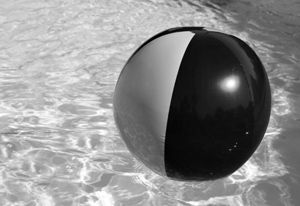
コンポーネントチャンネル(RGBの青など)を選択した場合、イメージ ウィンドウではイメージがグレースケールで表示されます。
 |
![[チャンネル]パレット](/img/examples/multibrush/howwork/select-blue-channel-jp.jpg "[チャンネル]パレット") |
| 青チャンネルの視覚化が有効 | RGB イメージ - 青チャンネルを編集可能 |
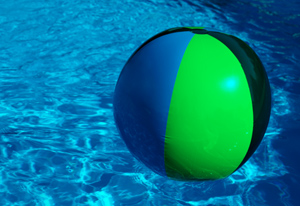
アクティブでないチャンネルの視覚化インジケータが有効な場合、イメージ ウィンドウにそのチャンネルが表示されているが、編集はできないことを意味します。
複数のチャンネルの視覚化が有効な場合、イメージはカラーで表示されます。
 |
![[チャンネル]パレット](/img/examples/multibrush/howwork/select-blue-view-green-jp.jpg "[チャンネル]パレット") |
| 青チャンネルと緑チャンネルの視覚化が有効 |
青チャンネルは編集可能 緑チャンネルの視覚化は有効ですが、編集は不可 |
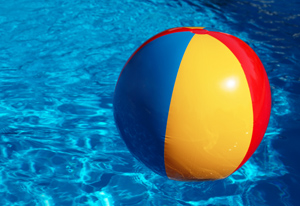
合成チャンネルを選択した場合、含まれているチャンネルもすべて視覚化が有効になります。
合成画像は常にリストの最初に表示され、デフォルトにより選択されます。
 |
![[チャンネル]パレット](/img/examples/multibrush/howwork/select-composed-image-jp.jpg "[チャンネル]パレット (RGB)") |
| 合成RGBイメージ | RGBチャンネルすべてが編集可能 |
チャンネルの編集には、通常の描画ツールを使用します。チャンネルに白で描画した場合、その色チャンネルの強度は100%になります。異なる色調の色は、異なる強度をもたらします。黒で描画した場合、色チャンネルを完全に削除することになります。
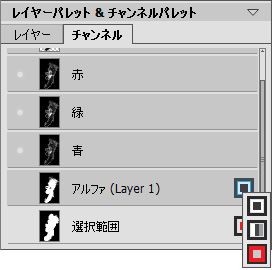
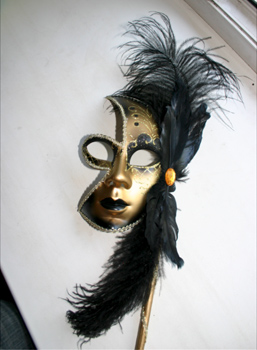
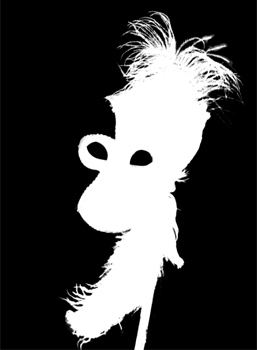
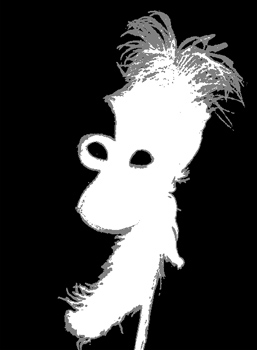
アルファ チャンネルは、デフォルトで不透明な領域は白、透明な領域は黒、半透明な領域はグレーで表示されるよう設定されています。
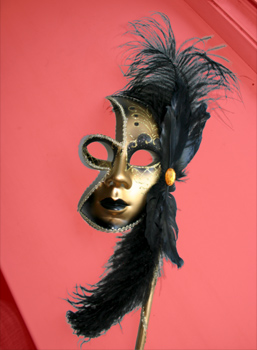
アルファ チャンネルの表示モードは、ポップアップ メニューから グレースケール、トリマップ、赤でハイライトから選択できます。
アルファ チャンネルの表示モード
 |
 |
| 元の RGB イメージ |
グレースケール: 黒い部分は透明、白い部分は不透明になります |
 |
 |
| トリマップ:黒: 透明、 グレー: 半透明、白: 不透明 |
赤でハイライト: 透明領域が赤でハイライトされます |
選択チャンネルの表示モードは、グレースケール、トリマップ、赤でハイライト、赤で逆ハイライト, 黒い背景、白い背景の6種類から選ぶことができます。