Graphic plugins for Windows Mac graphic plugins  
Please enter your email to be kept posted on updates and discounts:
 
  
  Products     Download     Online Store     Tutorial     Support     About Company
en  fr  de  es  pt  it  jp  ru    
 

Tutorial: AKVIS Stamp

Restoration of a colonnade


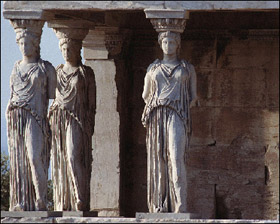
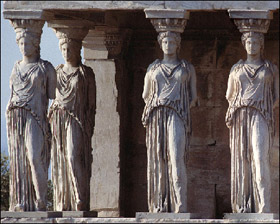
In the following example we are going to "restore" an ancient building. We will add one more statue to the image of the colonnade.

  • Step 1. Open the image in your photo editor.
    image of the colonnade before restoration
  • Step 2. Select the plugin AKVIS Stamp. In Adobe Photoshop, you should select the menu item Filter - AKVIS - Stamp, in Jasc Paint Shop Pro - the menu item Effects - Plugins- AKVIS - Stamp; and in Corel PHOTO-PAINT - Effects - AKVIS - Stamp.
  • Step 3. Select the Stamp tool from the Toolbar pressing the button Stamp and adjust the size of the stamp.
  • Step 4. Activate the check box Aligned so that every time you apply the stamp the patterns are taken in sequence concerning the source point.
  • Step 5. We will clone the third statue on the right. Press the ALT key (Option in Macintosh) and use the mouse cursor to set the source point for cloning in the base of the statue.
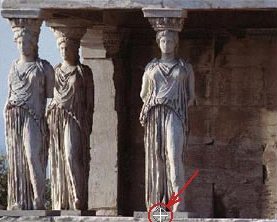
    Set the source area
  • Step 6. Move the cursor to the point of the image where you want to put the statue and clone it by one stroke. Never mind if you do not clone the statue in one step; as the check box Aligned is activated you can proceed with cloning where you have stopped.
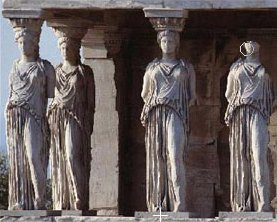
    Cloning process
  • Step 7. As soon as you complete the cloning of the statue and release the mouse button, AKVIS Stamp processes the image adjusting the color range and lightness of the cloned statue.
  • Step 8. Press the button Ok in the control panel of the program to apply the result of the plugin application and close the program window.
    Before the restorationAfter restoration
 
How It Works How It Works
Removing Freckles Removing Freckles
Restoration of a Colonnade Restoration of a Colonnade
A Girl in Eye Glasses A Girl in Eye Glasses
Removing Wrinkles Removing Wrinkles
Reflection Reflection
Removing Objects Removing Objects
Crystal Eggs Crystal Eggs
Girls at the Seaside Girls at the Seaside
Alter Ego Alter Ego
Removing Facial Shine Removing Facial Shine
Soldier on Duty Soldier on Duty
Polecats Polecats
Graffiti Removal Graffiti Removal
Cleaning Scanned Photos Cleaning Scanned Photos
Easter Eggs Easter Eggs
Photo Retouching Photo Retouching
Removing a Car from the Landscape Removing a Car from the Landscape
Odd Man Out Odd Man Out
Portrait of a Young Lady Portrait of a Young Lady
Family Photo Family Photo


   Privacy Policy | Site Map | Search | English  | Français  | Deutsch  | Español  | Português  | Italiano  | 日本語  | Pусский  | © 2004-2008, AKVIS LLC. All rights reserved.