Enliven the Color of a Face in AKVIS MultiBrush


Please enter your email to be kept posted on updates and discounts:
 
 
  Products     Download     Online Store     Tutorial     Support     Company      Customer Room
en  fr  de  es  pt  it  jp  ru    
 

Tutorial: AKVIS MultiBrush

How To Enliven the Color of a Face


In order for a person in a portrait to appear in a natural color, a photographer must have professional skills and be able to work well with light. Sometimes even great photos lack expressive colors, and could benefit from a small correction.

    Original Photo Result
    Photograph of a Girl After Processing With MultiBrush
  • Step 1. Open the photograph in AKVIS MultiBrush.
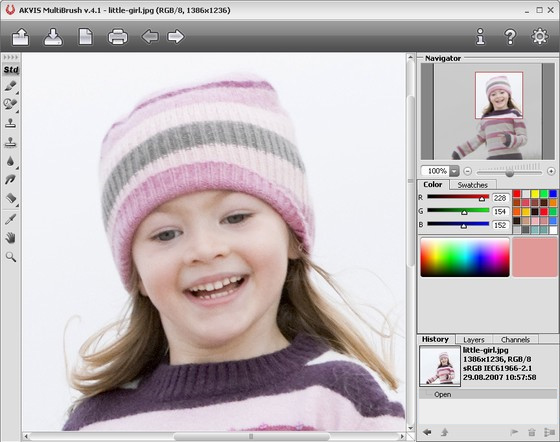
    Original Photograph
    Original Photograph
  • Step 2. Copy the background layer by dragging it to the button at the bottom of the Layers Palette.
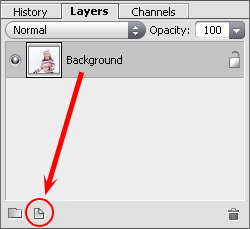
    Layers Palette
    Layers Palette
  • Step 3. Choose Multiply blend mode in the Layers and set a small value (20-30%) for Opacity. The photo's color tones will look more natural.
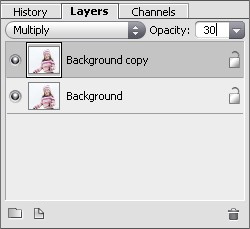
    Blending Layers
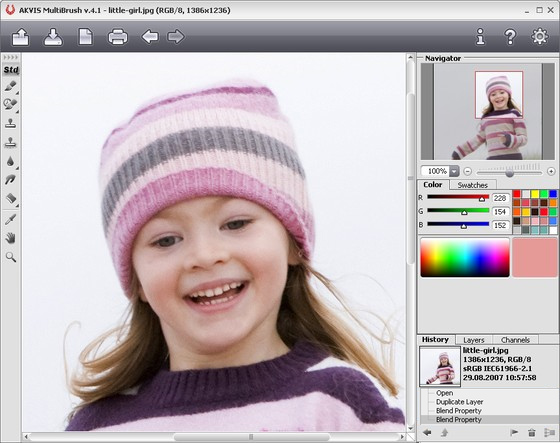
    Blending Layers

    Blending Result
    Result
 
How It Works How It Works
   — Workspace — Workspace
   — How To Use The Program — How To Use The Program
   — Create New Image — Create New Image
   — Preferences — Preferences
   — Hot Keys — Hot Keys
Palettes Palettes
   — Toolbar — Toolbar
   — Color — Color
   — Swatches — Swatches
   — History — History
   — Layers — Layers
   — Channels — Channels
Standard Brushes Standard Brushes
   — Color Brush — Color Brush
   — Color Pencil — Color Pencil
   — Spray — Spray
   — Eraser — Eraser
   — History Brush — History Brush
   — Clone Stamp — Clone Stamp
   — Chameleon Brush — Chameleon Brush
   — Blur — Blur
   — Sharpen — Sharpen
   — Smudge — Smudge
   — Lighten — Lighten
   — Darken — Darken
   — Saturation — Saturation
Artistic Brushes Artistic Brushes
   — Oil Brush — Oil Brush
   — Roller — Roller
   — Felt-tip Marker — Felt-tip Marker
   — Chalk — Chalk
   — Artistic Pencil — Artistic Pencil
   — Artistic Spray — Artistic Spray
   — Artistic Eraser — Artistic Eraser
Additional Tools Additional Tools
   — Eyedropper — Eyedropper
   — Hand — Hand
   — Zoom — Zoom
Examples Examples
   — Changing Eye Color — Changing Eye Color
   — Selecting Lipstick — Selecting Lipstick
   — How To Enliven the Color of a Face — How To Enliven the Color of a Face
   — Figure Correction — Figure Correction
   — Portrait Editing — Portrait Editing
   — Odd Man Out — Odd Man Out
   — Alter Ego — Alter Ego
   — Removing Facial Shine — Removing Facial Shine
   — Photo Retouching — Photo Retouching
   — Removing an Object — Removing an Object
   — Visiting a Wildlife Park — Visiting a Wildlife Park


back to top


   Privacy Policy | Site Map | Search at AKVIS    
   Contact Us | Twitter | Facebook | YouTube Channel    
| English  |Français  |Deutsch  |Español  |Português  |Italiano  |日本語  |Pусский  | © 2004-2012 AKVIS. All rights reserved.