Graphic software for Windows Mac graphic software
AKVIS ニュースの購読を申し込むには, 電子メールアドレスを入力してください。
 
  
  プログラム     ダウンロード     サイバーショップ     チュートリアル     サポート     会社情報
en  fr  de  es  pt  it  jp  ru    
 

チュートリアル: AKVIS MultiBrush

History Brush


あいにく, このページは英語にだけ使用可能です。日本語のバージョンは遠からず出ります。
Attention! You can get a free licence for an AKVIS program by translating texts from English to Japanese.
Please contact us at team@akvis.com.

The History Brush returns an area of an image to its original condition, where another tool had been applied. The difference between the tools Eraser and History Brush is the latter removes all effects, but does not affect the background.


To change the settings for parameters go to the Settings Panel. To change the value of a parameter, enter a numerical value in the parameter's field and press Enter (Macintosh: Return) or adjust the slider.

  • Diameter (1-500). The maximum diameter of a line made by the brush (in pixels).
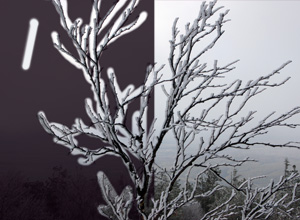
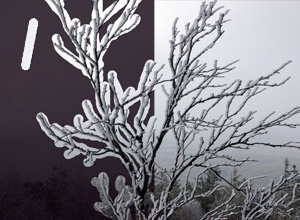
  • Hardness (0-100). The degree of blurriness of the brush's edges. As the value of this parameter is increased the brush's edges become harder. At values near 100% the border between the brush's edges and the background is very distinct; at lower values the transition between these areas is smoother.
  • Restore the Painted Over Branches With the History Brush
    (Diameter = 100, Strength = 100%)
    Soft Brush Edge Hard Brush Edge
    Hardness = 20% Hardness = 100%

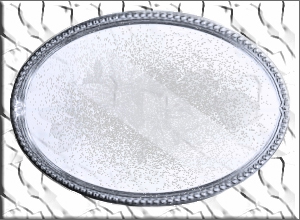
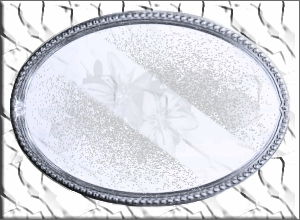
  • Strength (1-100). The degree of restoration to the original state. At lower values there will be less restoration and more blending with the effect; at values near 100% the original condition will be restored more completely.
  • Tom Sawyer Removes an Inscription from the Fence
    Partial Restoration Complete Restoration
    Strength = 50% Strength = 98%

 
操作方法 操作方法
   — ワークスペース — ワークスペース
   — 操作方法 — 操作方法
Palettes Palettes
Brushes Brushes
Tools Tools
操作例 操作例


   プライバシー | サイトマップ | Web サイトの検索 | English  |Français  |Deutsch  |Español  |Português  |Italiano  | 日本語  |Pусский  | © 2004-2009, AKVIS Software Inc. All rights reserved.