Rimuovere il lucido dal viso
A volte un buon primo piano può essere rovinato dal riflesso sul viso lucido, in questo caso AKVIS MultiBrush ci può essere di grande aiuto…vediamo come!
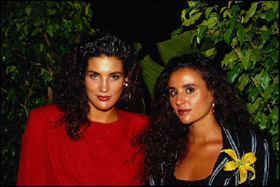

-
Passaggio 1. Selezionare lo strumento Pennello camaleonte premendo il pulsante
 e regolare le dimensioni del pennello.
- Passaggio 2. Disattivare la casella Allineato, in modo che ogni volta che si applica il timbro, il frammento viene preso sempre dallo stesso punto di partenza.
-
Passaggio 3. Premere il tasto Alt (Opzione su Mac), usare il tasto sinistro del mouse per specificare il punto di partenza che potrebbe essere una parte del viso non grassa oppure del collo o del decoltè.

-
Passaggio 4. Posizionare il cursore sulla fronte lucida della ragazza in rosso e applicare il frammento clonandolo.

Non appena il tasto viene rilasciato, l'oggetto clonato si fonde con il colore dell'immagine originale.

-
Passaggio 5. Procedere allo stesso modo sulle guance e sul mento della ragazza in rosso, successivamente eseguire lo stesso trattamento sulla seconda ragazza.
Abbiamo ritoccato la fotografia eliminando il riflesso del viso unto, il risultato è sorprendente!
Ecco il confronto tra "prima" e "dopo":