AKVIS Retoucher Tutorial. Photo restoration software. Portrait.


Inserisci la tua e-mail per essere informato delle novità:
 
 
  Prodotti     Download     Online Store     Tutorial     Supporto     Chi siamo      Account dell'utente
en  fr  de  es  pt  it  jp  ru    
 

Tutorial: AKVIS Retoucher

Restoration of a boy's photo


Siamo spiacenti, questa pagina al momento è disponibile solo in lingua inglese.
La versione italiana sarà presto disponibile.
Se desiderate ottenere la licenza per la traduzione per favore scriveteci.

The following photo restoration tutorial has been sent to us by Yuriy Karanfil.

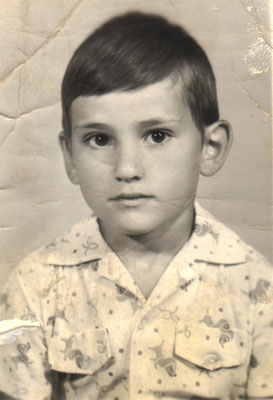
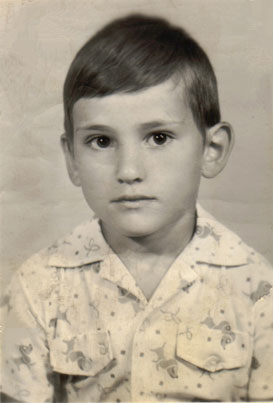
In this case AKVIS Retoucher restored the photo of the child by removing substantial defects: scratches, creases, stains.

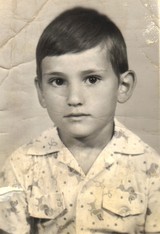
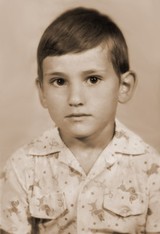
Original image Result

This is the original boy's photo.

Baby portrait for photo retouching

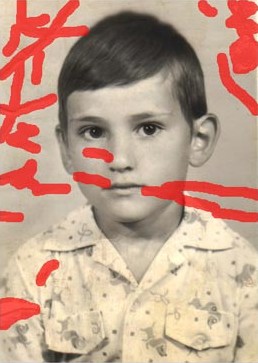
First of all, call AKVIS Retoucher and select all defects with any selection tool. In the Retoucher program window the selected parts of the image will be highlighted in red. Press the "Start" button in the program window and see the defects disappear.

Select all defects

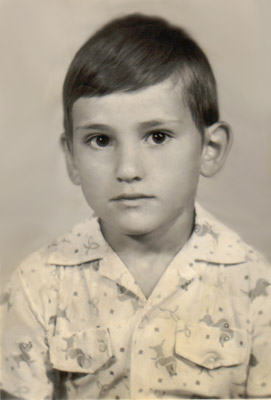
When the restoration proces is over and the result is applied you will see the following photo of the boy:

After Retoucher application

You can touch up the photo with the Clone Stamp or Chameleon Brush .

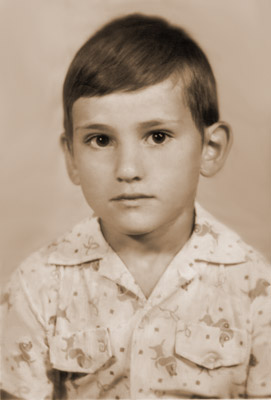
Also, you can convert the photo into sepia tones, so that it looks like an old photo. To do this in Adobe Photoshop select the command Sepia Toning (layer) in the Actions pallete and press the button Play selection in the lower part of the palette.

After photo retouching Baby portrait in Sepia tones
 
Come funziona Come funziona
   — Area di lavoro — Area di lavoro
   — Come usare il programma — Come usare il programma
   — Barra degli strumenti — Barra degli strumenti
   — Parametri dell'algoritmo — Parametri dell'algoritmo
   — Preferenze — Preferenze
Esempi Esempi
   — Rimozione di grandi figure da una foto  — Rimozione di grandi figure da una foto
   — Una vecchia foto di famiglia — Una vecchia foto di famiglia
   — Leonessa in gabbia — Leonessa in gabbia
   — Restauro della foto di un bambino — Restauro della foto di un bambino
   — Elaborazione di prestampa — Elaborazione di prestampa
   — Restauro di un dagherrotipo — Restauro di un dagherrotipo
   — Restauro di un ritratto — Restauro di un ritratto
   — Foto storica: un gruppo di zingari — Foto storica: un gruppo di zingari
   — Foto gravemente danneggiata — Foto gravemente danneggiata
   — Rimozione di macchie da una foto — Rimozione di macchie da una foto
   — Regalo per la festa della mamma — Regalo per la festa della mamma
   — Restauro di una vecchia foto — Restauro di una vecchia foto
   — Rimozione di graffi — Rimozione di graffi
   — Retoucher con PSElements — Retoucher con PSElements
   — Rimozione dei tatuaggi — Rimozione dei tatuaggi
   — Consigli per ampliare le immagini — Consigli per ampliare le immagini
   — Restauro di un'illustrazione lacerata — Restauro di un'illustrazione lacerata


ritorna sopra


   Informativa sulla privacy | Mappa del sito | Cerca nel sito    
   Contatti | Twitter | Facebook | YouTube Channel    
| English  |Français  |Deutsch  |Español  |Português  | Italiano  |日本語  |Pусский  | © 2004-2012 AKVIS. Tutti i diritti riservati.