環境設定
 [環境設定]ダイアログボックスを開きます。次のようになります。
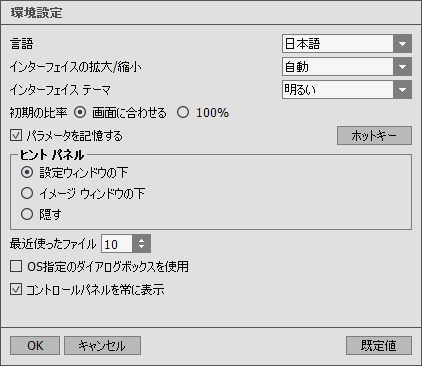
- 言語: UI言語を切り替える場合、ドロップダウンメニューから言語を選択し、[OK]をクリックします。
- インターフェイスの拡大/縮小:インターフェイス要素のサイズを選択します。自動に設定されている場合、ワークスペースは、自動的に画面の解像度に合わせて拡大/縮小されます。
- インターフェイス テーマ:インターフェイスのテーマを選択します。明るい または暗いの2種類のテーマがあります。
-
初期の比率: このオプションは、開いたイメージをイメージ ウィンドウに拡大/縮小する方法を設定します。以下のいずれかの値を設定します。
- [画面に合わせる]: イメージウィンドウに全体が表示されるように、拡大/縮小が調整されます。
- [100%]: イメージは拡大/縮小されません。[100%]に設定すると、ほとんどの場合イメージの一部のみウィンドウに表示されます。 - [パラメータを記憶する]チェックボックス: チェックボックスを有効(オン)にした場合、最後に使用した技法やパラメータの変更を記憶し、プログラムを起動する度に表示されます。
- [ホットキー]ボタン: クリックすると、ダイアログボックスが表示され、すべてのツールや操作に対して キーボード ショートカット を設定できます。
-
ヒント パネル: カーソルをパラメータやボタンに合わせた場合、それらに関する簡単なヒントが表示されます。ヒントの表示方法に関する設定は以下の通りです。
- イメージウィンドウの下: メインウィンドウ内のイメージの下に表示します。このモードは、ウィンドウの高さが低く、設定パネルの下にヒントを表示するだけのスペースがない場合に便利です。
- 設定パネルの下: 右側の設定パネルの下にヒントが表示されます。
- 隠す: ヒントの表示する必要がない場合は、このオプションを選択します。 -
最近使ったファイル (スタンドアロン版のみ) : 最近使ったファイルの表示数を指定します。時間でソートされた使用ファイルの一覧は、
 を右クリックすると表示されます。設定可能な最大ファイル数は、30ファイルです。
- [OS指定のダイアログボックスを使用]チェックボックス: システムの[開く]/[保存]ダイアログボックスを使用する場合に選択します。デフォルトの設定では、AKVIS File Dialog が使用されます。
- [コントロールパネルを常に表示]チェックボックス: トップパネルの表示/非表示の切り替えができなくなります。つまり、このチェックボックスが有効な場合、パネルは常に表示されます。パネルの固定を解除するには、このチェックボックスをオフにします。オフにすると、パネル中央の三角をクリックしてパネルの表示/非表示を切り替えられます。三角にマウスオーバーすると、最小化されたパネルが表示されます。
[環境設定]ウィンドウでの変更内容を保存するには、[OK]をクリックします。
デフォルト設定に戻す場合は、[デフォルト]をクリックします。