Restoration of a colonnade
Questa pagina al momento è usufruibile in lingua inglese. La versione italiana sarà presto disponibile.
In this tutorial we will show how to "restore" an ancient building using AKVIS MultiBrush. We will add one more statue to the photo of the colonnade.
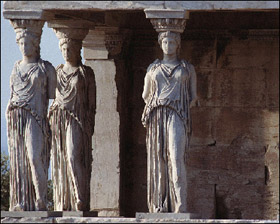
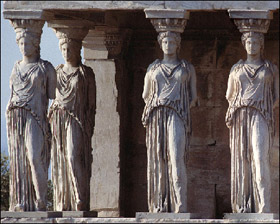
- Step 1. Open the image in AKVIS MultiBrush.
- Step 2. Select the Chameleon Brush
 and adjust the size of the tool.
This tool copies a fragment of an image from one part to another with respect to the color range, tone, texture, illumination, and other characteristics of the background, to which the clone is applied.
- Step 3. Activate the Aligned check-box so that every time you apply the tool the patterns are taken in sequence concerning the source point.
- Step 4. We will clone the third statue on the right. Press the Alt key (Option in Mac) and use the mouse cursor to set the source point for cloning in the base of the statue.
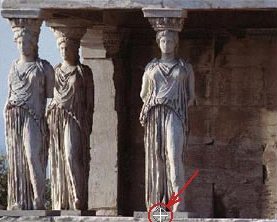
- Step 5. Move the cursor to the point of the image where you want to put the statue and clone it by one stroke.
Never mind if you do not clone the statue in one step; as the Aligned check-box is activated you can proceed with cloning where you have stopped.
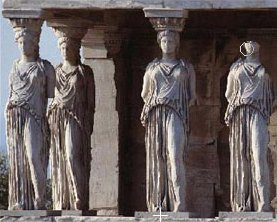
- Step 6. As soon as you complete the cloning of the statue and release the mouse button, AKVIS MultiBrush
processes the image adjusting the color range and lightness of the cloned statue.
- Step 7. Press the button
 to save the result in the file.