Plugins de Photoshop en Windows 32 bit
Acontece que después de la instalación del plugin, este plugin no aparece en el menú Filtro de Adobe Photoshop o Photoshop Elements.
En este caso, hay que completar la instalación manualmente. Siga estos pasos, por favor:
1 método:
- Copie los archivos con la terminación .8bf:
por ejemplo, Enhancer.8bf de la carpeta correspondiente C:\Archivos de programa\AKVIS\Enhancer
en la carpeta Plugins de Photoshop CS6: C:\Archivos de programa\Adobe\Photoshop CS6\Plugins. - Abra Photoshop y seleccione el plugin, por ejemplo, Filtro -> AKVIS -> Enhancer.
2 método:
- Si los plugins todavía no están disponibles en el menú Filtro, haga lo siguiente:
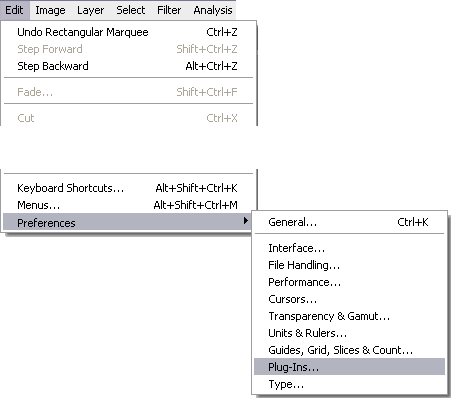
Llame al comando Edición -> Preferencias -> Plugins.
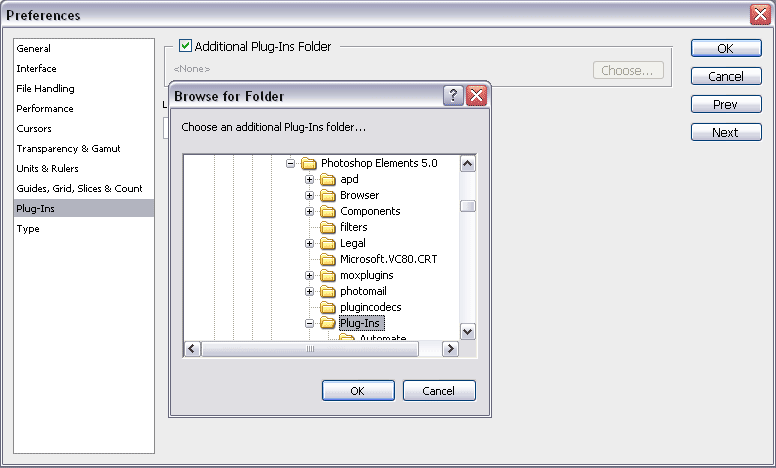
Preferencias - Seleccione la casilla Carpeta de plugins adicional y, a continuación, utilice el botón Seleccionar para elegir la carpeta, por ejemplo, C:\Archivos de programa\Adobe\Photoshop CS6\Plugins, adonde haya copiado los archivos .8bf.
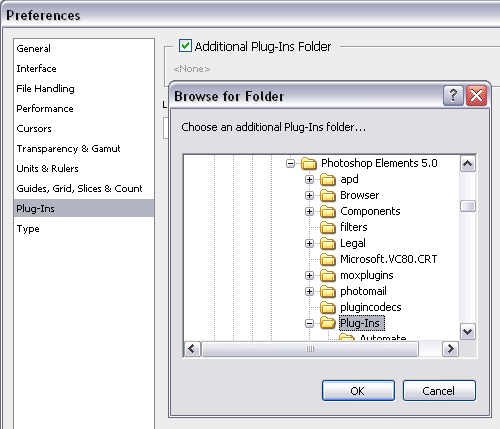
Selección de la carpeta adicionalReinicie Photoshop y llame al comando Filtro -> AKVIS -> Enhancer.