Alter Ego: Create a Cloned Image in AKVIS MultiBrush


Ingrese su email para suscribirse a la lista de AKVIS.
 
 
  Productos     Descargar     Tienda online     Tutorial     Apoyo técnico     Compañia      Área de clientes
en  fr  de  es  pt  it  jp  ru    
 

Tutorial: AKVIS MultiBrush

Alter Ego


Esta información está disponible solamente en inglés. La version en español aparecerá pronto.

The author of this example is Gun Legler. She used the plugin version with Jasc Paint Shop Pro 7.
You can use the standalone version of Multibrush and achieve the same results as in this example.

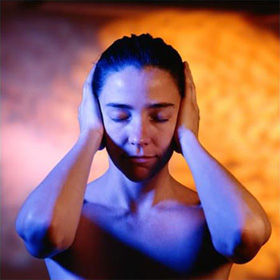
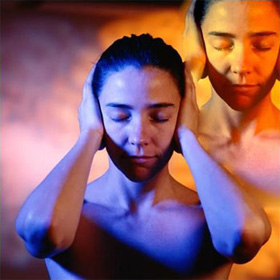
Gun Legler applied the AKVIS MultiBrush plugin to add a cloned image of the girl to the original picture. When a clone of the specified object is adjusted to the background, the resulting picture has a different color range and lightness.

Original image Artistic cloning

To achieve the same result follow the instructions:

  • Step 1. Open the original image in your photo editor and call AKVIS MultiBrush by calling the command:

    in Paint Shop Pro: Effects -> Plugins -> AKVIS -> MultiBrush;
    in Photoshop: Filter -> AKVIS -> MultiBrush.

  • Step 2. Select the Chameleon Brush tool from the Toolbar and adjust the size of the brush.
    (It was the Stamp tool in the old versions v.1-3 of the program.)
  • Step 3. Activate the check-box Aligned, so that every time you apply the stamp the patterns are taken in sequence concerning the source point. Therefore, you do not need to clone the girl in one stroke.
  • Step 4. Keeping the Alt-key pressed, specify the starting point for cloning on the face of the girl.
  • Step 5. Move the cursor to the right upper corner and clone the girl's face.
  • Step 6. Press the button on the Control Panel to apply the result.
 
Cómo funciona Cómo funciona
   — Área de trabajo — Área de trabajo
   — Utilizar el programa — Utilizar el programa
   — Crear una nueva imagen — Crear una nueva imagen
   — Opciones — Opciones
   — Teclas de atajo — Teclas de atajo
Paletas Paletas
   — Barra de herramientas — Barra de herramientas
   — Color — Color
   — Muestras — Muestras
   — Historia — Historia
   — Capas — Capas
   — Canales — Canales
Pinceles standard Pinceles standard
   — Pincel de color — Pincel de color
   — Lápiz de color — Lápiz de color
   — Aerosol — Aerosol
   — Borrador — Borrador
   — Pincel histórico — Pincel histórico
   — Támpon de clonar — Támpon de clonar
   — Pincel Camaleón — Pincel Camaleón
   — Desenfocar — Desenfocar
   — Enfocar — Enfocar
   — Dedo — Dedo
   — Aclarar — Aclarar
   — Oscurecer — Oscurecer
   — Saturación — Saturación
Pinceles artísticos Pinceles artísticos
   — Pincel al óleo — Pincel al óleo
   — Rodillo — Rodillo
   — Rotulador — Rotulador
   — Barra de tiza — Barra de tiza
   — Lápiz artístico — Lápiz artístico
   — Aerosol artístico — Aerosol artístico
   — Borrador artístico — Borrador artístico
Herramientas Herramientas
   — Cuentagotas — Cuentagotas
   — Mano — Mano
   — Zoom — Zoom
Ejemplos Ejemplos
   — El tercero está de más — El tercero está de más


volver arriba


   Política de privacidad | Mapa Web | Buscar    
   Contáctenos | Twitter | Facebook | YouTube Channel    
| English  |Français  |Deutsch  | Español  |Português  |Italiano  |日本語  |Pусский  | © 2004-2012 AKVIS. Todos los derechos reservados.