Instalar plugins en Corel PaintShop Pro
Los plugins son programas que se integran en otro programa adicionando nuevas características y aumentando su funcionalidad. En el programa de Corel también se pueden instalar plugins de terceros de otros desarrolladores de software.
Todos los plugins de AKVIS son compatibles con PaintShop Pro (excepto Magnifier que solo funciona con Photoshop). Ver la página de compatibilidad.
Nota: Algunos plugins tienen problemas con las selecciones realizadas en Corel PaintShop Pro X5, X6. Si el plugin no funciona, verifique si hubo una selección. Luego anule la selección y llame al plugin. En la mayoría de los casos, puede realizar una selección utilizando las herramientas del plugin.
Una de las preguntas más comunes es cómo agregar plugins a un editor de fotos. Imagínese. Encontraste nuevos y grandiosos plugins en Internet, instalados en su ordenador, pero que no aparecen en su editor de fotos.
Le mostraremos cómo añadir plugins para Corel Paint Shop Pro Photo.
¿Cómo hacer para que un plugin aparezca en PaintShop Pro?
Puede copiar los archivos 8bf (Método 1) o agregar la carpeta del plugin en las opciones (Método 2, recomendado).
- Método 1. Copie el archivo 8bf en la carpeta de plugins del editor de imagen.
Por ejemplo para instalar el plugin AKVIS ArtSuite hay que:
- en PaintShop Pro CC 2022:
Copiar ArtSuite_64.8bf de la carpeta AKVIS\ArtSuite (en Archivos de programa) a:
C:\Archivos de programa\Corel\Corel PaintShop Pro 2022 (64-bit)\PlugIns\EN\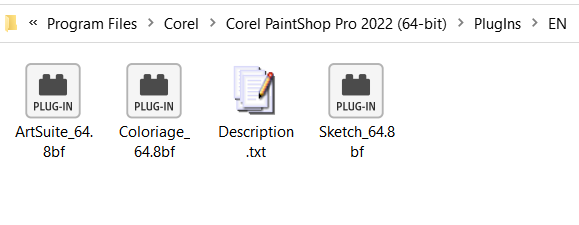
- PaintShop Pro X6 64-bit:
Copiar ArtSuite_64.8bf de la carpeta AKVIS\ArtSuite (en Archivos de programa) a:
C:\Archivos de programa\Corel\Corel PaintShop Pro X6 (64-bit)\PlugIns\EN\ - PaintShop Pro X6 32-bit:
Copiar ArtSuite.8bf de la carpeta AKVIS\ArtSuite a:
C:\Archivos de programa (x86)\Corel\Corel PaintShop Pro X6\PlugIns\EN\
Para otras versiones del editor puede buscar una carpeta llamada "PlugIns" en el directorio PaintShop Pro.
También puede copiar los archivos a la carpeta C:\Archivos de programa\Corel\Plugins.
- en PaintShop Pro CC 2022:
- Método 2.
Este método funciona para la mayoría de los programas para edición de gráficos. No es necesario copiar o mover nada, sólo tiene que configurar las preferencias una vez para usarlos de nuevo.
Abra Corel PaintShop Pro y seleccione nel menú: Archivo -> Preferencias -> Ubicación de archivos.
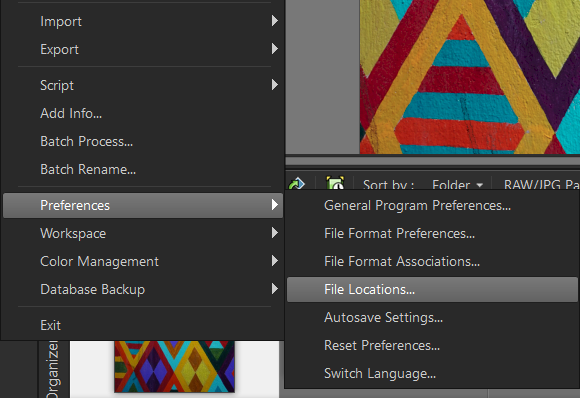
Seleccione la opción Plugins en la parte izquierda de la caja de dialogo.
En la parte derecha seleccione Habilitar plugins… y pulse el botón Agregar.
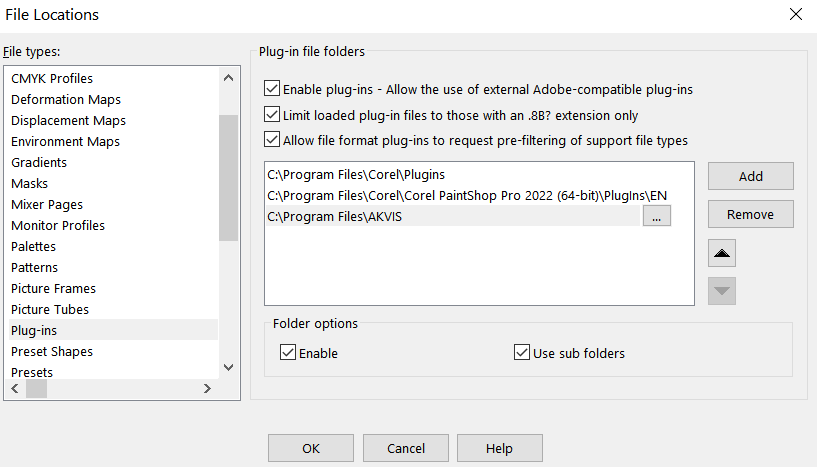
A continuación, busque la carpeta donde se encuentra el Plugin instalado.
Por ejemplo, para añadir plugins de AKVIS en PaintShop Pro seleccione la carpeta AKVIS en el directorio archivos de programa: C:\Archivos de programa\AKVIS.
Y pulse Aceptar (OK).
La opción Usar subdirectorios debe ser marcada. A continuación, todos los subdirectorios (para todos los plugins de AKVIS) serán utilizados por PaintShop Pro. Ahora cada vez que instale un nuevo plugin de AKVIS en su equipo, se añadirá a Corel automáticamente.
Ahora vaya a la opción del menú Efectos para ver los plugins instalados.
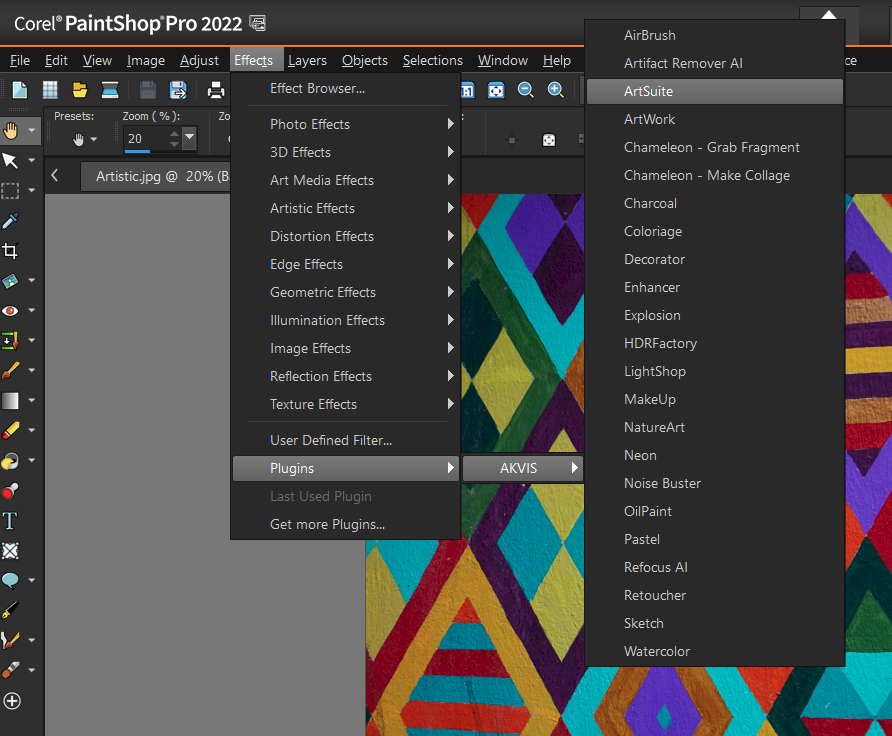
Aquí puede encontrar los plugins de AKVIS para Paint Shop Pro.