Graphic software for Windows Mac graphic software
Please enter your email to be kept posted on updates and discounts:
 
  
  Products     Download     Online Store     Tutorial     Support     Company
en  fr  de  es  pt  it  jp  ru    
 

Tutorial: AKVIS MultiBrush

Removing an object


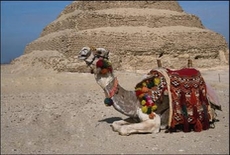
Earlier we applied MultiBrush tools only to remove small defects (wrinkles, freckles, birthmarks and scars). Now we set ourselves a more global task. We will open an image with a camel and a cameleer and will remove the latter from the photo.
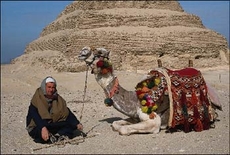
    Original image Result
  • Step 1. Select the Chameleon Brush tool from the Toolbar of AKVIS MultiBrush. Just press the button .

    Adjust the size of the brush.

  • Step 2. Deactivate the check box Aligned so that every time you apply the brush the pattern is taken from one and the same starting point.

    We have to do this as there is not an appropriate part of the desert to fill the place of the cameleer.

  • Step 3. Press the Alt key (Option on Macintosh) and use the left mouse button to specify the pattern of the desert that has the same texture as the area near the cameleer's head.
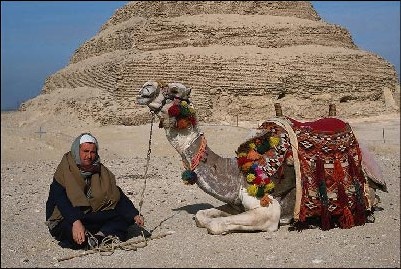
    Set the source point
  • Step 4. Apply the brush to replace the head, shoulders and the rope with the cloned texture.
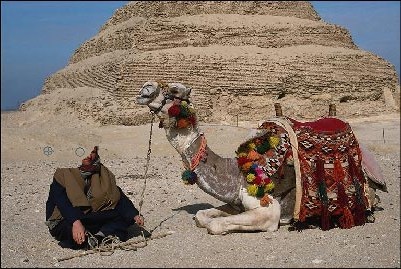
    Removing the object
  • Step 5. Now press the Alt key and use the left mouse button to specify the pattern on the sand in the foreground on the left of the cameleer.
  • Step 6. Apply the brush in strokes to paint the bedouin, his stick and the lower part of the rope.
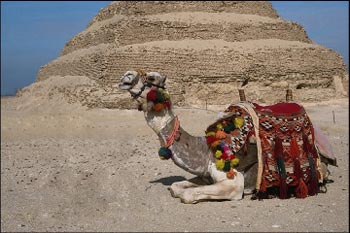
    Result
 
How It Works How It Works
   — Workspace — Workspace
   — How It Works — How It Works
Palettes Palettes
   — Toolbar — Toolbar
   — Color — Color
   — Swatches — Swatches
   — History — History
Brushes Brushes
   — Color Brush — Color Brush
   — Color Pencil — Color Pencil
   — Eraser — Eraser
   — History Brush — History Brush
   — Clone Stamp — Clone Stamp
   — Chameleon Brush — Chameleon Brush
   — Blur — Blur
   — Sharpen — Sharpen
   — Smudge — Smudge
   — Lighten — Lighten
   — Darken — Darken
   — Saturation — Saturation
Tools Tools
   — Eyedropper — Eyedropper
   — Hand — Hand
   — Zoom — Zoom
Examples Examples
   — Portrait Editing — Portrait Editing
   — Odd Man Out — Odd Man Out
   — Alter Ego — Alter Ego
   — Removing Facial Shine — Removing Facial Shine
   — Photo Retouching — Photo Retouching
   — Removing an Object — Removing an Object
   — Visiting a Wildlife Park — Visiting a Wildlife Park


   Privacy Policy | Site Map | Search    
   Contact Us | Twitter | Facebook   
| English  |Français  |Deutsch  |Español  |Português  |Italiano  |日本語  |Pусский  | © 2004-2010 AKVIS.com. All rights reserved.