Graphic software for Windows Mac graphic software  
Tragen Sie Ihre E-Mail ein, um auf AKVIS-Newsletter zu abonnieren.
 
  
  Produkte     Download     Online Store     Tutorial     Support     Impressum
en  fr  de  es  pt  it  jp  ru    
 

Tutorial: AKVIS Coloriage

William Gladstone: Colourize a Photo in Paint Shop Pro


This colourization tutorial has been sent to us by David Kelly. David also presents the tutorial as a an executable eBook (available for download at the end of the page).


Until recently, if you wanted to digitally colourize black and white photos a good working knowledge of a quality image editing program such as Paint Shop Pro, Photoshop, etc. was needed. Now however, with the introduction of the AKVIS Coloriage plug-in digital colourizing has just got a lot easier, less time consuming, and much more fun!

The AKVIS Coloriage plug-in is an affordable, easy to use piece of software that integrates into your existing image editing program adding new features and increasing its functionality.

Here you will see how the AKVIS Coloriage plug-in was used in conjunction with Paint Shop Pro 9 to create a coloured version of a previously edited original black and white photograph.


ORIGINAL PHOTOGRAPH

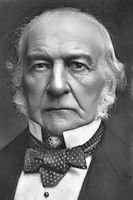
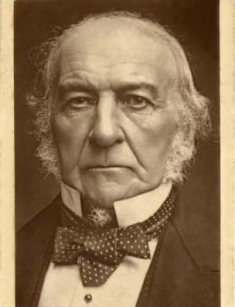
Below is the original sepia-toned photo before it was edited using Paint Shop Pro 9. Another AKVIS plug-in, Stamp, was also used during the editing work. This is a cloning tool similar to Photoshop's Healing Tool.
William Gladstone, original sepia-toned photo
Image 01 - William Gladstone
Copyright Roger Vaughan


EDITED PHOTOGRAPH

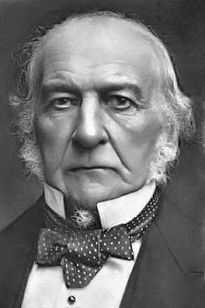
Below is the same photograph as shown in Image 01 after it was edited using Paint Shop Pro 9 in conjunction with the AKVIS Stamp plug-in.
retouched photo
Image 02


A PRACTICAL EXAMPLE

This section contains a brief explanation of how the AKVIS Coloriage plug-in was used to create a coloured version of the black and white photograph, Image 02.

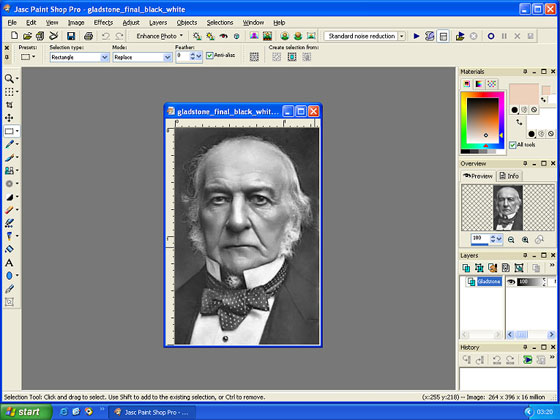
First the photo was opened in Corel's Paint Shop Pro 9.
Paint Shop Pro 9's workspace
Image 03 - Paint Shop Pro 9's workspace


WORKSPACE "BEFORE" VIEW

The AKVIS Coloriage plug-in was then loaded via Paint Shop Pro 9's Effects menu - Plugins - AKVIS - Coloriage. The Coloriage workspace now looks similar to the one shown below.
AKVIS Coloriage's workspace
Image 04 - AKVIS Coloriage's workspace "Before" view.


WORKSPACE "STROKES" VIEW

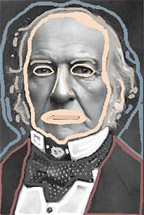
The pencil tool was used to draw coloured outlines within all sections of the photo using colours selected from the Colour Library section. These are known as "Strokes".

The workspace with the photo and its added coloured strokes is shown below. A photo's "Strokes" can be saved as .strokes files. These can be reloaded and used with the same photo for subsequent editing.
AKVIS Coloriage's workspace
Image 05 - AKVIS Coloriage's workspace "Strokes" view.


WORKSPACE "AFTER" VIEW

After all strokes have been completed a colourized version of the original photograph can be previewed by clicking the Run button Run. If OK, the strokes can now be saved. The colourization effect was then applied to the image by clicking the Apply button Apply located top right. The workspace showing the new coloured "After" version of the photograph can be seen below.
AKVIS Coloriage's workspace
Image 06 - AKVIS Coloriage's workspace "After" view.


THE COLOURIZED PHOTOGRAPH

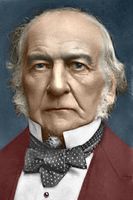
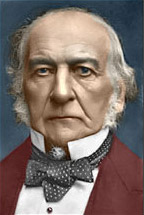
Image 07 is the original restored black and white photograph and Image 08 shows the completed AKVIS Coloriage v2.0.0 colourized version.
the photograph before colourization colourized photo
Image 07 Image 08


IN CONCLUSION

For anyone with an interest in digital photo colourization who owns a compatible image editing program, the AKVIS Coloriage plug-in is one of those "must have" add-ons that you shouldn't be without, and you don't need to be an expert in digital imaging to use it successfully.

As with most black and white photographs that are digitally colourized the colours used are subjective. To make choosing the "correct" colour easier the AKVIS Coloriage v2.0.0 plug-in includes a Colour Library section with fourteen colour categories; People, Grass, Leaves, Wood, Stones, Bricks, Sky, Clouds, Water, Metals, Paper, Ground, Glass, and Fabric.

Colours can also be selected using the plug-in's "Colours" chart.


As this article only gives a very brief overview of the AKVIS Coloriage plug-in, to read more detailed user instructions please click here.


You can read this article in e-book

click here to download the e-book

 
Arbeitsweise Arbeitsweise
Tipps und Tricks Tipps und Tricks
Eine alte Postkarte Eine alte Postkarte
Grundfarbe des Autos ändern Grundfarbe des Autos ändern
Einfärben eines S/W-Fotos Einfärben eines S/W-Fotos
Bilder teilweise entfärben Bilder teilweise entfärben
Farbkorrektur: rote Augen entfernen Farbkorrektur: rote Augen entfernen
Ein Portrait einfärben Ein Portrait einfärben
Ein Verfahren zum mehrmaligen Einfärben Ein Verfahren zum mehrmaligen Einfärben
Ein Geschenk zum Muttertag Ein Geschenk zum Muttertag
Kanadische Siedler Kanadische Siedler
Foto eines Kindes Foto eines Kindes
Farben für die Innenausstattung Farben für die Innenausstattung
Einfärben eines Familienfotos Einfärben eines Familienfotos
Die Farbe der Kleidung ändern Die Farbe der Kleidung ändern
Einfärben eines Gruppenfotos Einfärben eines Gruppenfotos
Farbiger Hintergrund Farbiger Hintergrund
Erinnerungen einfärben Erinnerungen einfärben
Eine Frau mit Flieder Eine Frau mit Flieder
Die Wände anstreichen Die Wände anstreichen
Mosaik-Hintergrund Mosaik-Hintergrund
Partielle Einfärbung Partielle Einfärbung
Ausdrucksvolle Augen einer Katze Ausdrucksvolle Augen einer Katze
Porträt einer Geisha Porträt einer Geisha
Flachrelief einfärben Flachrelief einfärben
Tipps zum Kolorieren Tipps zum Kolorieren
Alte Postkarte mit einer Geisha Alte Postkarte mit einer Geisha
Nachbearbeitung eingefärbter Fotos Nachbearbeitung eingefärbter Fotos
Zeichnung im Anime-Stil Zeichnung im Anime-Stil
Ein Foto für Fotomontage Ein Foto für Fotomontage
Blumen ausmalen Blumen ausmalen
Zeichnung: Selbstbildnis Zeichnung: Selbstbildnis
Weihnachtspostkarte Weihnachtspostkarte
Liebesgeschichte Liebesgeschichte
Zeichnung ein- und umfärben Zeichnung ein- und umfärben
Ein misslungenes S/W-Foto retten Ein misslungenes S/W-Foto retten


   Datenschutzhinweis | Sitemap | Suchwort eingeben | English  | Français  | Deutsch  | Español  | Português  | Italiano  | 日本語  | Pусский  | © 2004-2008, AKVIS Software Inc. Alle Rechte vorbehalten.